How to Connect the Ahrefs MCP Server to Manus
Ahrefs has an official MCP server. Manus has an official MCP integration. The connection didn't work out of the box. This is what happened, what I learned, and the working setup including a downloadable Manus skill.
I’ve been using Manus as my AI agent for a while now. If you haven’t come across it, the short version is this: it’s an AI agent that can browse the web, write code, run scripts, manage files, and connect to external tools through something called MCP (Model Context Protocol). Think of MCP as a standardised way for AI agents to talk to external APIs without you needing to write custom integrations from scratch.
Ahrefs launched their own MCP server a few months ago. The pitch is genuinely compelling. Instead of manually pulling data from the Ahrefs dashboard, your AI agent can query it directly. Ask Manus to research a competitor’s backlink profile, and it just does it. No copy pasting. No CSV exports. No switching tabs.
I wanted that. So I followed the documentation.
It needed a bit more work than expected.

What the Docs Tell You to Do
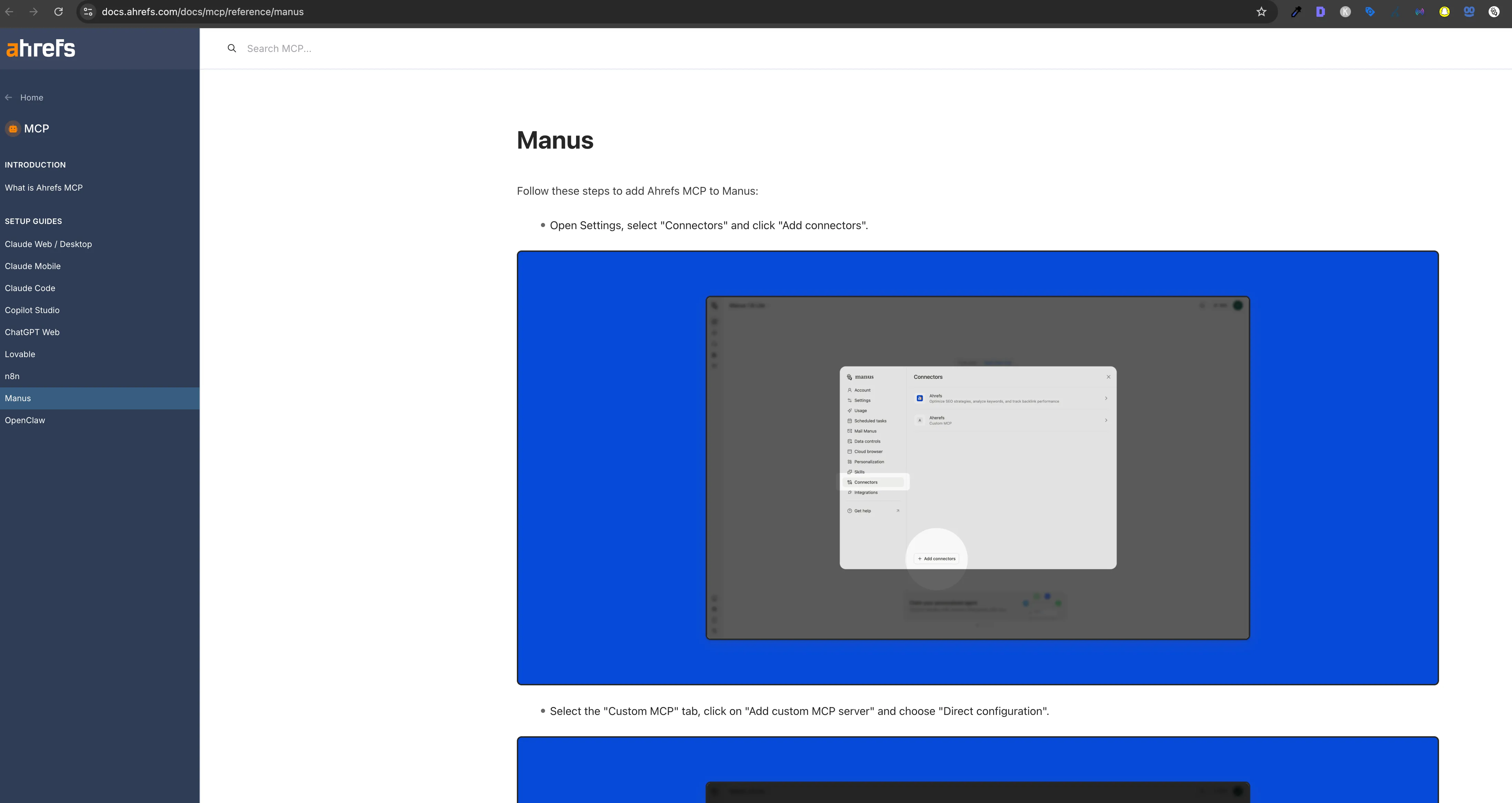
The Ahrefs MCP documentation has a dedicated Manus setup guide. It’s short and clear. It tells you to:
- Go to your Manus settings and add a new MCP connector
- Set the server URL to
https://api.ahrefs.com/mcp/mcp - Add your Ahrefs MCP token as a Bearer token in the Authorization header
****
That’s a reasonable set of instructions. I did exactly that, saved the connector, went back to a Manus task, and asked it to check the domain rating for a site.
Manus tried to call the Ahrefs tool via manus-mcp-cli and got back a 401 Unauthorized error.
OAuth authentication failed for server 'ahrefs'The token was set correctly. The docs described this as the right approach. But Manus was attempting OAuth authentication instead of passing the Bearer token through.
What’s Actually Happening Under the Hood
Here’s what I eventually worked out after digging into how Manus handles MCP connections.
When Manus connects to an MCP server, it uses a tool called manus-mcp-cli. This CLI reads your connector configuration, including your Bearer token, and is supposed to forward it to the MCP server. The issue is that for the Ahrefs connector specifically, the token isn’t being forwarded correctly through the proxy layer. The CLI falls back to attempting OAuth authentication, which the Ahrefs MCP server doesn’t support. That’s where the 401 comes from.
This isn’t a problem with the Ahrefs MCP server itself. The server works perfectly when called directly. I confirmed this with a simple curl request:
curl -s -X POST https://api.ahrefs.com/mcp/mcp \
  -H "Authorization: Bearer YOUR_TOKEN" \
  -H "Content-Type: application/json" \
  -H "Accept: application/json, text/event-stream" \
  -d '{"jsonrpc":"2.0","id":1,"method":"tools/list","params":{}}'
That returned all 95 tools immediately. The Ahrefs MCP server is solid. The gap is on the Manus connector proxy side, and it’s the kind of thing that will likely be addressed as MCP integrations mature. Hopefully the Ahrefs team can also update their Manus setup guide once the proxy behaviour is documented more clearly.
In the meantime, the workaround is to bypass manus-mcp-cli entirely and call the Ahrefs MCP endpoint directly via Python. That’s exactly what the Manus skill in this post does.
What the Ahrefs MCP Server Actually Is
Before getting into the fix, it’s worth understanding what you’re working with. The Ahrefs MCP server uses Streamable HTTP transport, not SSE (Server Sent Events) like some older MCP implementations. Every call is a standard HTTP POST to https://api.ahrefs.com/mcp/mcp with a JSON RPC 2.0 payload.
The server exposes 95 tools across 10 categories:
| Category | Tools | What You Can Do |
|---|---|---|
| Site Explorer | 24 | Backlinks, referring domains, organic keywords, top pages, competitors, DR history |
| Web Analytics | 34 | Visitors by country, device, browser, source, UTM, referrer, with time series data |
| Keywords Explorer | 6 | Search volume, difficulty, CPC, matching terms, related terms, country breakdown |
| Brand Radar | 9 | AI brand mentions, share of voice in LLMs, cited domains and pages |
| Site Audit | 3 | Crawl health scores, issues, per page content |
| Rank Tracker | 5 | SERP snapshots, competitor rankings, position tracking |
| Management | 5 | Projects, tracked keywords, competitor lists |
| Batch Analysis | 1 | Up to 100 domains compared simultaneously |
| SERP Overview | 1 | Live SERP data for any keyword |
| Subscription Info | 1 | Usage, limits, API key expiration |
The Brand Radar category is the one I hadn’t seen in other SEO APIs. It tracks whether your brand appears in AI generated responses from major LLMs. That’s a genuinely useful capability right now given how much search behaviour is shifting toward AI answers.
The Fix: A Manus Skill That Calls the Ahrefs MCP Server Directly
Rather than waiting for the Manus connector proxy to be updated, I built a Manus skill that handles the Ahrefs connection directly. A skill in Manus is a small package of files: a SKILL.md with instructions, optional Python scripts, and reference files that Manus loads automatically when it detects a relevant task.
The skill does three things. It stores the connection config (endpoint URL, headers). It provides a reusable Python client that makes direct HTTP calls to the Ahrefs MCP server. And it includes a full tool catalog so Manus knows what’s available without needing to call tools/list on every task.
Download the skill from GitHub →
The token is obviously not included. Add yours to references/config.md before use. Instructions are in the file.
Setting It Up
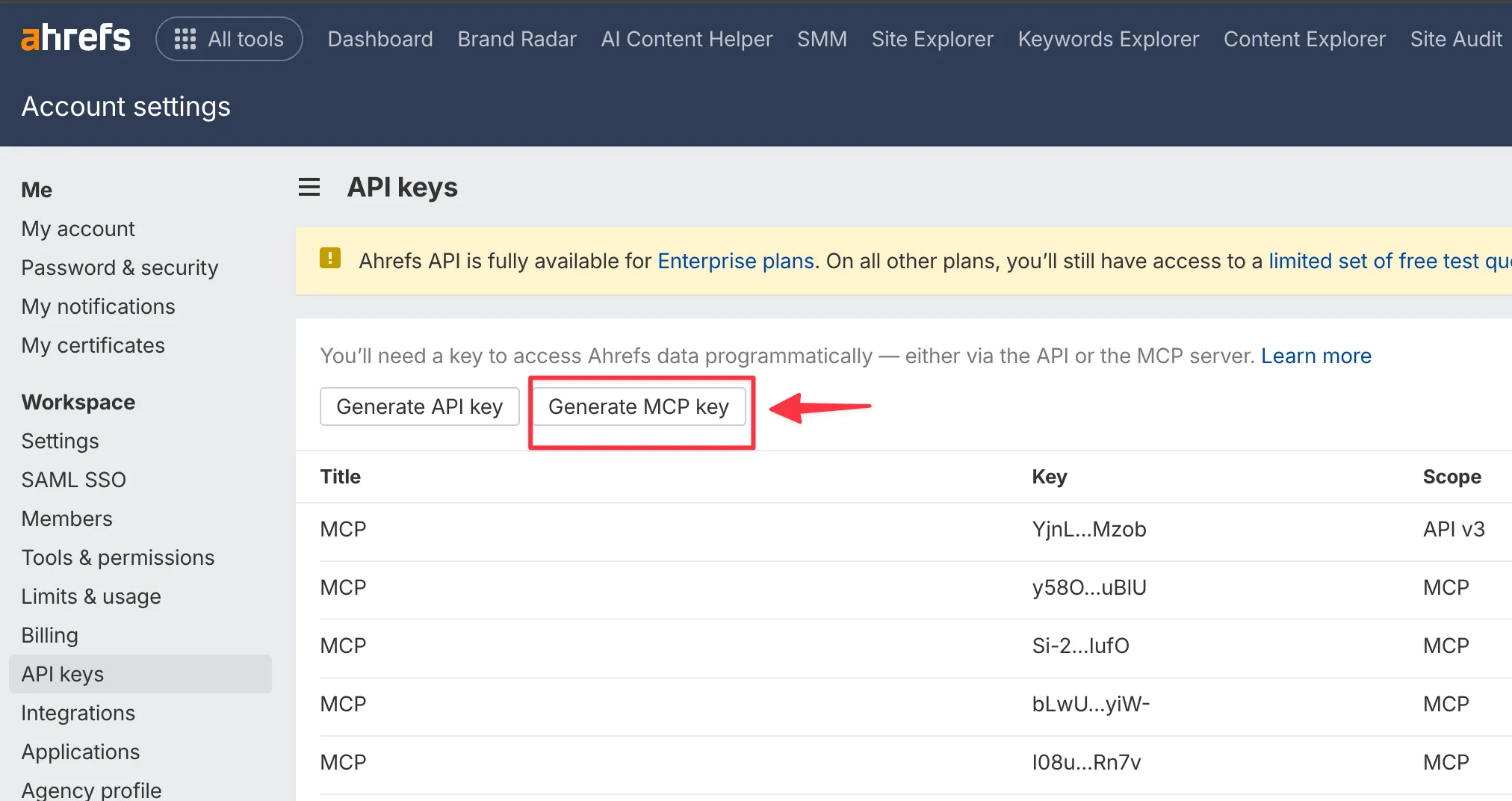
Step 1: Get Your Ahrefs MCP Token
Go to app.ahrefs.com/user/api-access. You need an Ahrefs subscription with API access enabled. Generate an MCP Key from that page.
****
Step 2: Install the Skill
Download the zip file from the GitHub releases page and extract it. You’ll get a folder with this structure:
ahrefs-mcp-skill-download/
├── SKILL.md
├── scripts/
│   └── ahrefs_client.py
└── references/
    ├── config.md
    └── tool_catalog.md
Copy it to your Manus skills directory:
cp -r ahrefs-mcp-skill-download/ ~/skills/ahrefs-mcp/Step 3: Add Your Token
Open references/config.md and replace YOUR_AHREFS_MCP_TOKEN_HERE with your actual token. That’s the only file you need to edit.
Step 4: Test It
Run the client script directly to confirm everything is working:
python ~/skills/ahrefs-mcp/scripts/ahrefs_client.pyYou should see your subscription info, a domain rating for ahrefs.com, and some keyword data come back. If you get an error, double check that the token in config.md matches exactly what Ahrefs gave you.
How the Python Client Works
The ahrefs_client.py script is the core of the skill. It’s a thin wrapper around the Ahrefs MCP JSON RPC protocol. Every call follows the same pattern: POST to the endpoint with a tools/call method, pass the tool name and its arguments, parse the result.content array for text responses.
def call_tool(tool_name: str, arguments: dict, timeout: int = 25) -> str:
    payload = {
        "jsonrpc": "2.0",
        "id": _req_id,
        "method": "tools/call",
        "params": {"name": tool_name, "arguments": arguments},
    }
    resp = requests.post(MCP_URL, headers=HEADERS, json=payload, timeout=timeout)
    data = resp.json()
    if "result" in data:
        texts = [c["text"] for c in data["result"]["content"] if c.get("type") == "text"]
        return "\n".join(texts)
    elif "error" in data:
        return f"ERROR: {data['error']['message']}"
The server also returns an apiUsageCosts object alongside the actual data, which tells you how many API units the call consumed. Worth keeping an eye on if you’re running bulk research tasks.
Watch out For These
There are a few things worth knowing before you start building on top of this.
The doc tool is not optional. The tools/list endpoint returns simplified schemas for each tool. They’re missing required fields and don’t tell you which column names are valid for the select parameter. Before using any tool for the first time, call doc with the tool name to get the real schema:
from ahrefs_client import call_tool
print(call_tool("doc", {"tool": "site-explorer-organic-keywords"}))
This returns the full input schema with every valid column name. Skip this step and you’ll spend time debugging “column not found” errors.
Most tools require a date parameter. Even when the simplified schema doesn’t list it as required, most Site Explorer tools will return an error without a date in YYYY-MM-DD format. Use the first of the month for historical snapshots.
Monetary values are in USD cents. The org_cost, paid_cost, cpc, and traffic_value fields all return values in cents, not dollars. A cpc of 450 means $4.50. Divide by 100 before displaying anything to a human.
mode=subdomains is almost always what you want. When analysing a full domain, use mode=subdomains and protocol=both. The mode=domain option excludes www and all subdomains, which gives you incomplete data for most sites.
The select parameter format is inconsistent between tools. For most tools it’s a comma separated string: "select": "keyword,volume,difficulty,cpc". For batch-analysis it’s an array: "select": ["domain_rating", "org_traffic", "backlinks"]. The doc tool will tell you which format each tool expects.
Some Actual Data
To show this isn’t just theoretical, here’s what came back from live API calls during testing.
Batch comparison of major SEO tools (data as of Jan 2025):
| Domain | DR | Organic Traffic / mo | Backlinks | Referring Domains | Organic Keywords |
|---|---|---|---|---|---|
| ahrefs.com | 91 | 4,418,422 | 4,956,337 | 96,892 | 72,794 |
| semrush.com | 92 | 13,060,510 | 14,062,485 | 129,002 | 249,244 |
| moz.com | 91 | 1,499,712 | 10,341,001 | 107,359 | 41,554 |
| majestic.com | 83 | 38,111 | 4,388,933 | 16,303 | 4,602 |
That’s four domains compared in a single API call using the batch-analysis tool. Genuinely useful for competitive research.
Top organic keywords for ahrefs.com (US, Jan 2025, by traffic):
| Keyword | Search Volume | Position | Est. Traffic |
|---|---|---|---|
| ai humanizer | 389,000 | 2 | 57,040 |
| ahrefs | 57,000 | 1 | 54,073 |
| paragraph rewriter | 45,000 | 1 | 48,245 |
| sentence rewriter | 58,000 | 1 | 43,715 |
| humanize ai | 421,000 | 4 | 39,534 |
Interesting that Ahrefs’ top traffic driver isn’t an SEO keyword at all. They’ve clearly been building free AI writing tools aggressively to capture that traffic.
Referring domain growth for ahrefs.com throughout 2024:
| Month | Referring Domains |
|---|---|
| Jan 2024 | 57,947 |
| Apr 2024 | 62,108 |
| Jul 2024 | 69,282 |
| Oct 2024 | 73,830 |
| Jan 2025 | 80,998 |
That’s a 40% increase in referring domains in twelve months.
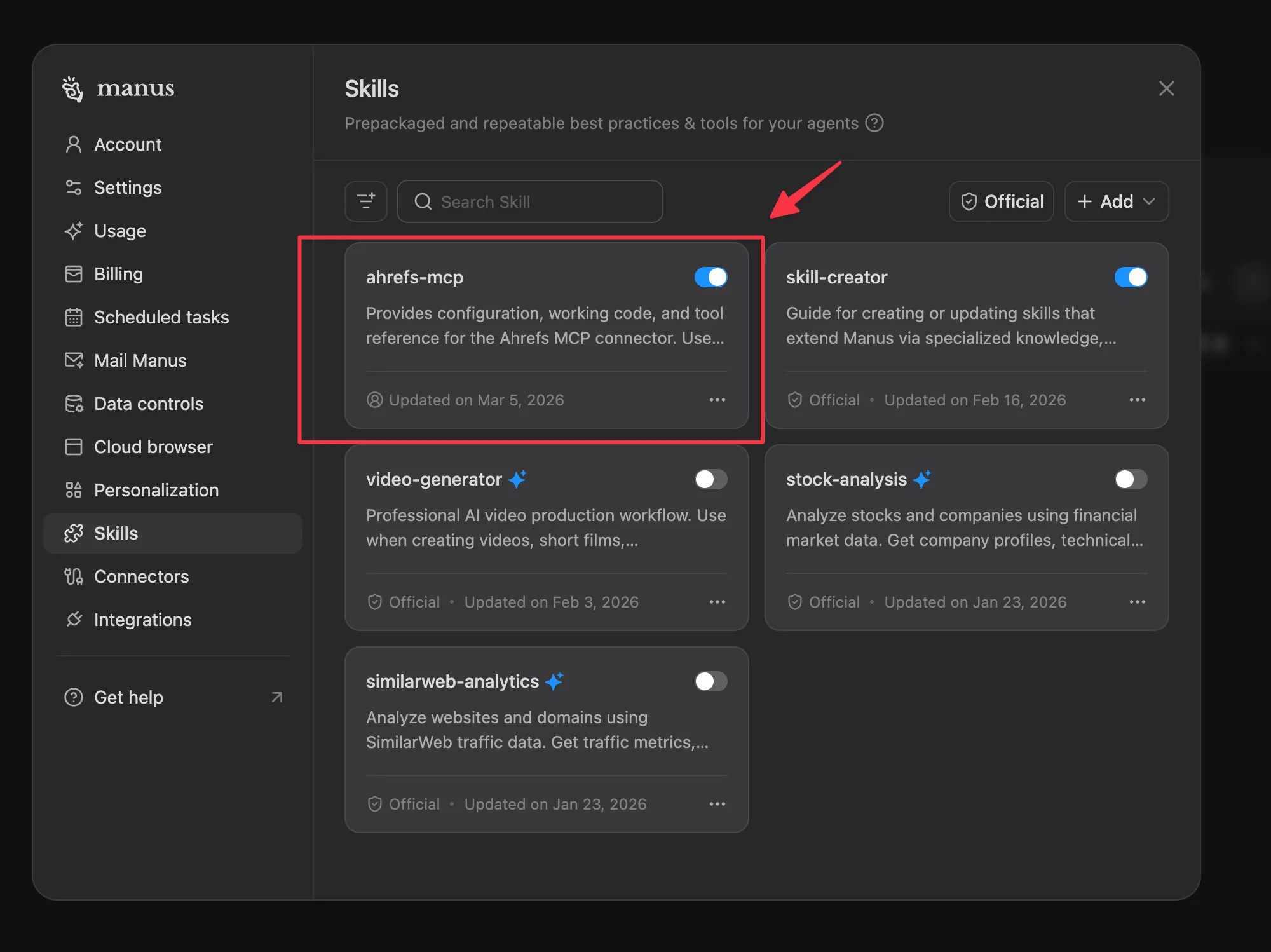
You can also test this from your Manus ‘Skills’ section.
Go to Setting → Skills
What You Can Actually Do With This in Manus
Once the skill is installed, Manus picks it up automatically whenever you ask for Ahrefs data. You don’t need to reference the skill explicitly in your prompt. Just ask naturally:
“Compare the backlink profiles of these three competitors and tell me which has the strongest referring domain base.”
“What are the top 10 keywords driving traffic to [domain] right now? Show me volume and estimated traffic for each.”
“Pull the SERP for ‘best [keyword]’ and tell me the domain rating and backlink count for every result in the top 10.”
“Check whether our brand appears in AI generated responses for [keyword] using Brand Radar.”
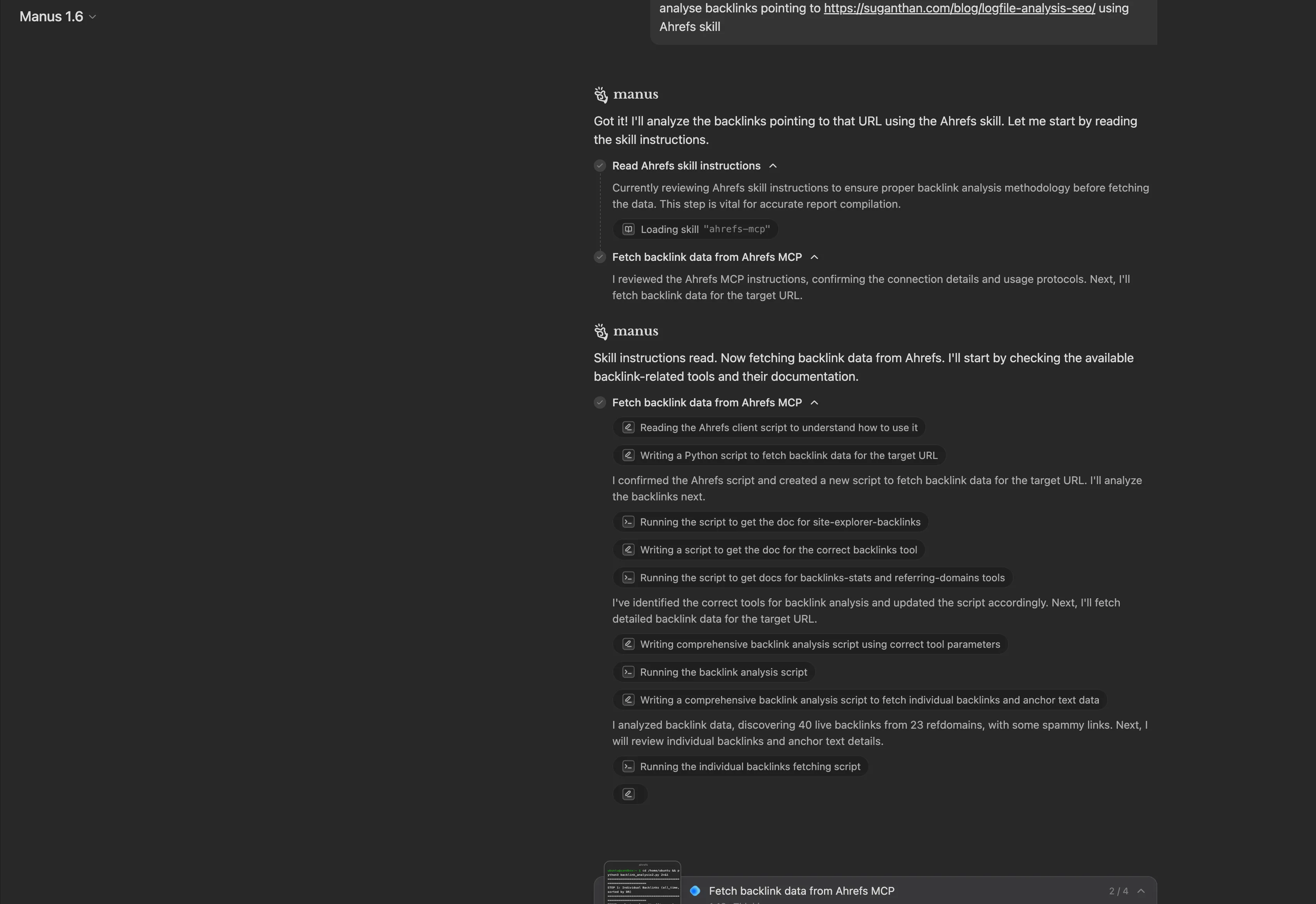
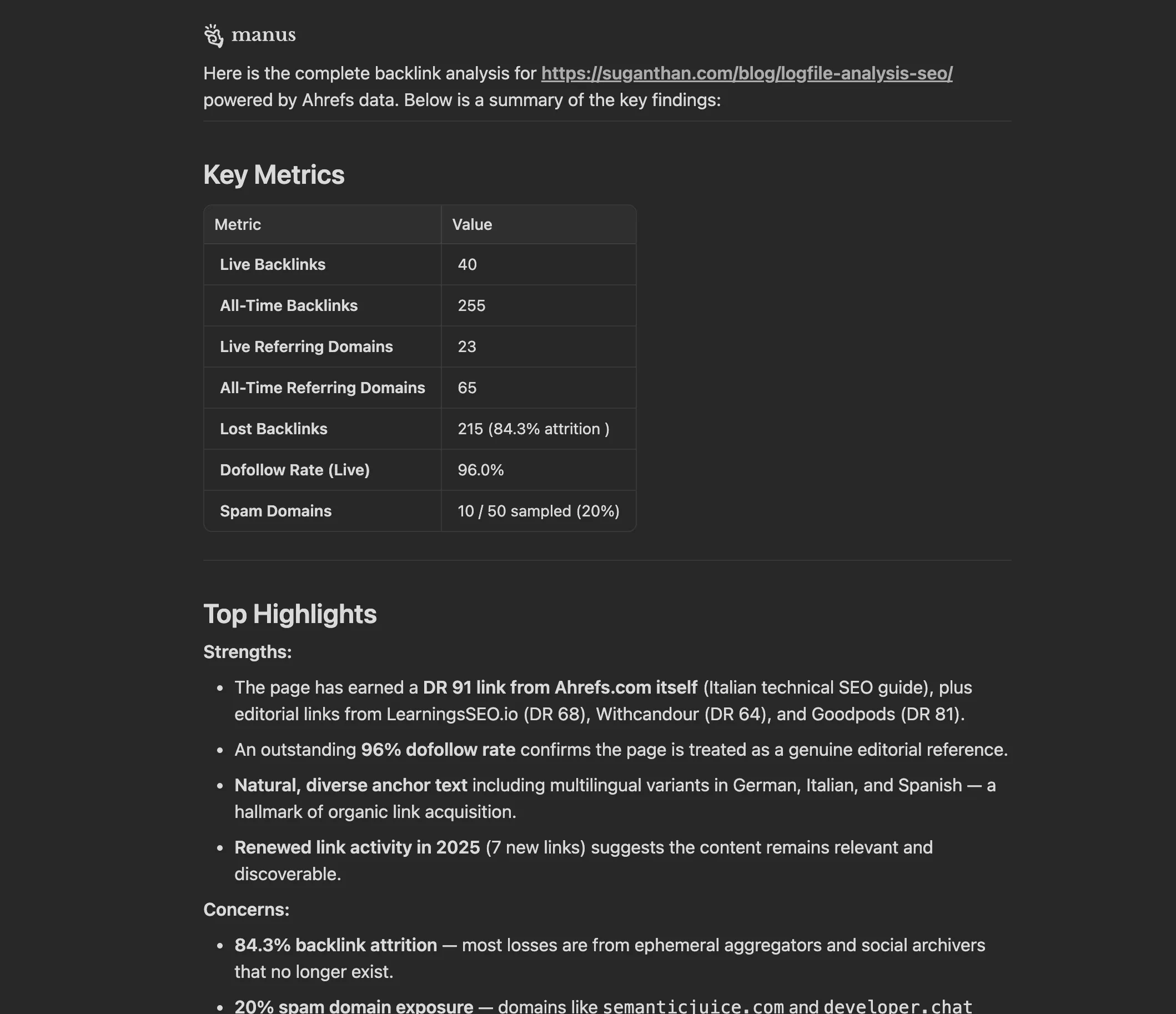
“Analyse backlinks pointing to https://suganthan.com/blog/logfile-analysis-seo/ using Ahrefs skill”
Manus reads the SKILL.md, imports the Python client, figures out which of the 95 tools to call, and returns structured data. The coverage is broad enough that most SEO research tasks can be handled without leaving the agent.
The one thing it doesn’t replace is the Ahrefs UI for visual analysis. You still want the dashboard for things like link intersect, content gap, and the visual crawl maps. But for programmatic data retrieval and anything you want to automate or chain with other tasks, this works well.
The Skill File Structure
The skill is designed to be easy to extend. The SKILL.md tells Manus what the skill does and when to use it. The references/tool_catalog.md lists all 95 tools with descriptions, so Manus can pick the right one without calling tools/list every time. The scripts/ahrefs_client.py is the actual HTTP client.
If you want to add your own wrapper functions (say, a get_competitor_overview() that chains multiple tool calls into one response) just add them to ahrefs_client.py. The skill will pick them up automatically on the next task.
ahrefs-mcp/
├── SKILL.md                  ← Manus reads this to know when to use the skill
├── scripts/
│   └── ahrefs_client.py      ← The HTTP client (add your own helpers here)
└── references/
    ├── config.md             ← Your token lives here
    └── tool_catalog.md       ← All 95 tools with descriptions
The Honest Summary
The Ahrefs MCP server is well built. 95 tools, clean JSON RPC protocol, good error messages once you know which columns are valid. The documentation covers the setup steps clearly for most MCP clients.
The gap is specific to how Manus’s connector proxy currently handles Bearer token authentication. It doesn’t forward the token correctly, so the built in integration fails with a 401. This may well be resolved by the time you read this. If you’ve found a cleaner fix or the native integration is now working for you, I’d genuinely like to know.
In the meantime, the skill in this post bypasses the proxy by calling the Ahrefs MCP server directly via Python. It takes about five minutes to set up, and once it’s in place, Manus uses it automatically for any task that involves Ahrefs data.
Download the skill from GitHub → (Add your own token to references/config.md before use)
If this saved you some time, a credit or link back is always appreciated. And if you build something interesting on top of it, I’d love to see it.
You might also like
Stay in the loop
I'll email you when I publish something new. No spam. No fluff.
Join other readers. Unsubscribe anytime.

Entrepreneur & Search Journey Optimisation Consultant. Co-founder of Keyword Insights and Snippet Digital.