Rowboat Gave Me an AI Coworker That Actually Remembers Everything
An honest guide to Rowboat, the open source AI assistant that builds a private knowledge graph from your emails and meetings. How to set it up, why local models save you money, and what you can actually do with it.
Every AI tool I’ve used has the same problem.
You open a new chat. You explain your situation. You give it context. It helps you. Then you close the chat, and next time you come back, it’s forgotten everything. You’re starting from scratch. Every. Single. Time.
It’s like hiring an assistant who gets amnesia at the end of every conversation.
I’ve been testing a tool called Rowboat that does something fundamentally different. Instead of starting cold every time, it builds a knowledge graph from your emails, meetings, and notes, and that graph grows over time. The more you use it, the more it knows. Ask it to prep you for a meeting next Tuesday and it already knows who you’re meeting, what you discussed last time, what decisions were made, and what’s still outstanding.

And the whole thing runs locally on your machine. Your data stays yours.
What Even Is a Knowledge Graph? (Without the Jargon)
Before we go further, let’s kill the jargon. A “knowledge graph” sounds like something from a computer science lecture. It’s not.
Think of it like this. Your brain already has a knowledge graph. You know that Anja works at Company X. She’s involved in Project Y. Last time you spoke, she mentioned budget concerns. You know all of this because your brain connects these dots naturally.
Rowboat does the same thing, but by reading your emails and meeting notes. It creates a web of connections: People you interact with, Organizations they belong to, Projects you’re working on together, and Topics that keep coming up. Every new email or meeting adds more connections to this web.
The difference between this and a regular AI chat? When you ask Claude or ChatGPT “Prep me for my meeting with Anja,” they have no idea who Anja is. You’d have to explain everything. Rowboat already knows because it’s been reading your emails with Anja for weeks.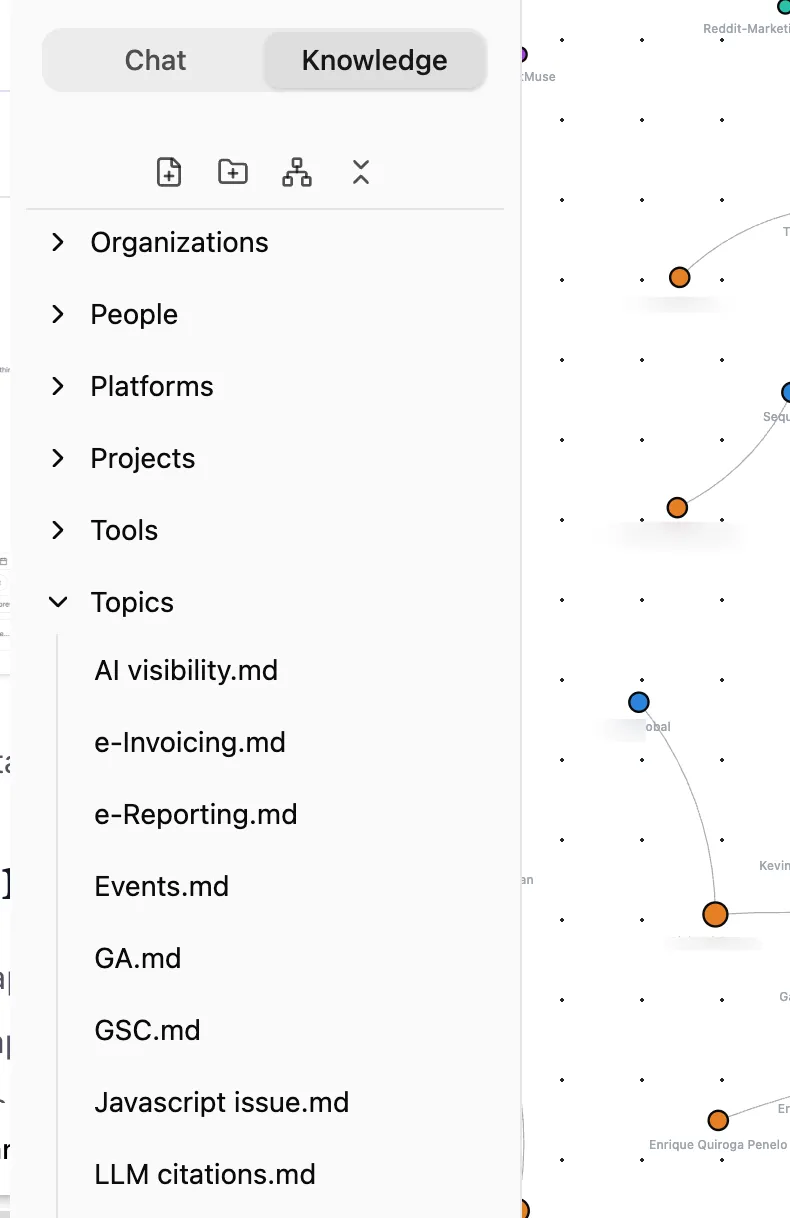
Why This Matters More Than You Think
Here’s the thing nobody talks about when they discuss AI productivity tools, context is everything.
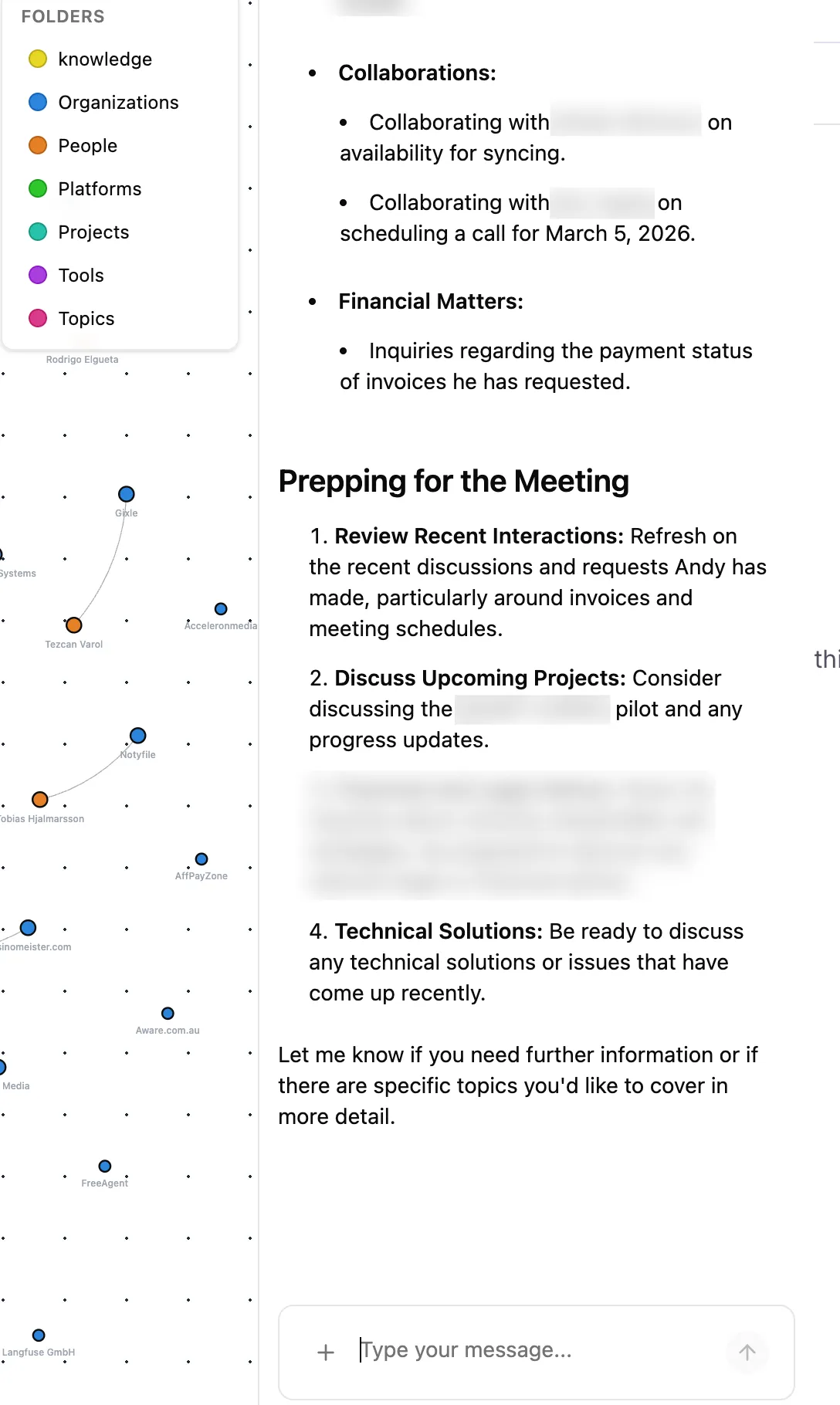
The reason your human assistant is useful isn’t because they’re faster than you at typing. It’s because they know the background. They know that when you mention “the Monday project,” you mean the Reddit visibility pilot. They know Andy’s invoices are overdue. They remember that Roi wants to schedule a call this week.
Most AI tools have none of this. They’re brilliant but amnesiac.
Rowboat solves this by building a persistent memory layer from your actual work data. Not a vague “memory” feature that remembers you like Italian food. A structured, queryable graph of your professional relationships, projects, decisions, and commitments.
“
Setting It Up (It’s Easier Than You’d Think)
Step 1: Download and Install
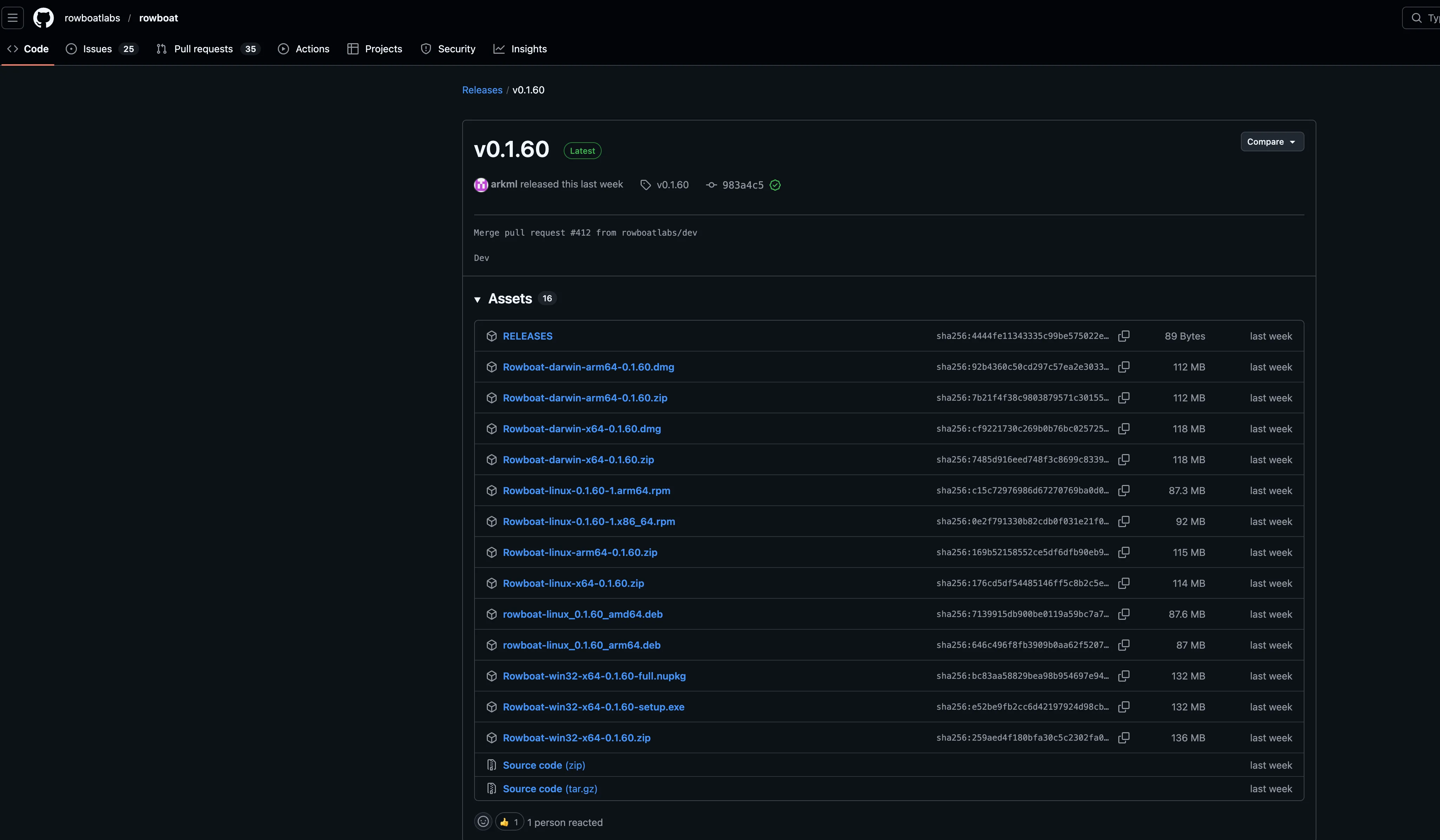
Rowboat has a desktop app for macOS, Windows, and Linux. Grab it from the GitHub releases page.
On Mac, it’s a standard .dmg file. Download, drag to Applications, done.
“
Step 2: Choose Your AI Model (This Is the Important Bit)
This is where most people trip up, and where the biggest cost decision lives.
Rowboat is model agnostic. It doesn’t care which AI brain powers it. You can use:
| Provider | Cost | Privacy |
|---|---|---|
| OpenAI (GPT 5.4) | Pay per token via API | Your data goes through OpenAI’s servers |
| Anthropic (Claude) | Pay per token via API | Your data goes through Anthropic’s servers |
| Google Gemini | Generally cheaper per token | Your data goes through Google’s servers |
| Ollama (local) | Free. Zero. Nothing. | 100% stays on your machine |
Here’s my strong recommendation, Start with Ollama.
Why? Because Rowboat’s knowledge graph agent runs constantly in the background. Every 30 seconds, it scans your synced data and extracts entities and relationships. Every query you make, every background task, every email draft, that all consumes API tokens.
With OpenAI or Anthropic, you’re paying for every single one of those operations. On a busy inbox with dozens of emails a day plus meeting transcripts, that can easily **hit $200 to $1000+ a month **depending on your scale. Just for the AI processing. Not the software (which is free), just the API costs.
With Ollama, all of that processing happens locally on your hardware. No API costs whatsoever. The trade off is that local models are slower and sometimes less capable than the big cloud models for complex reasoning. But for entity extraction (figuring out that “Sarah from Acme Corp mentioned Project X”) and simple queries, local models work perfectly well.
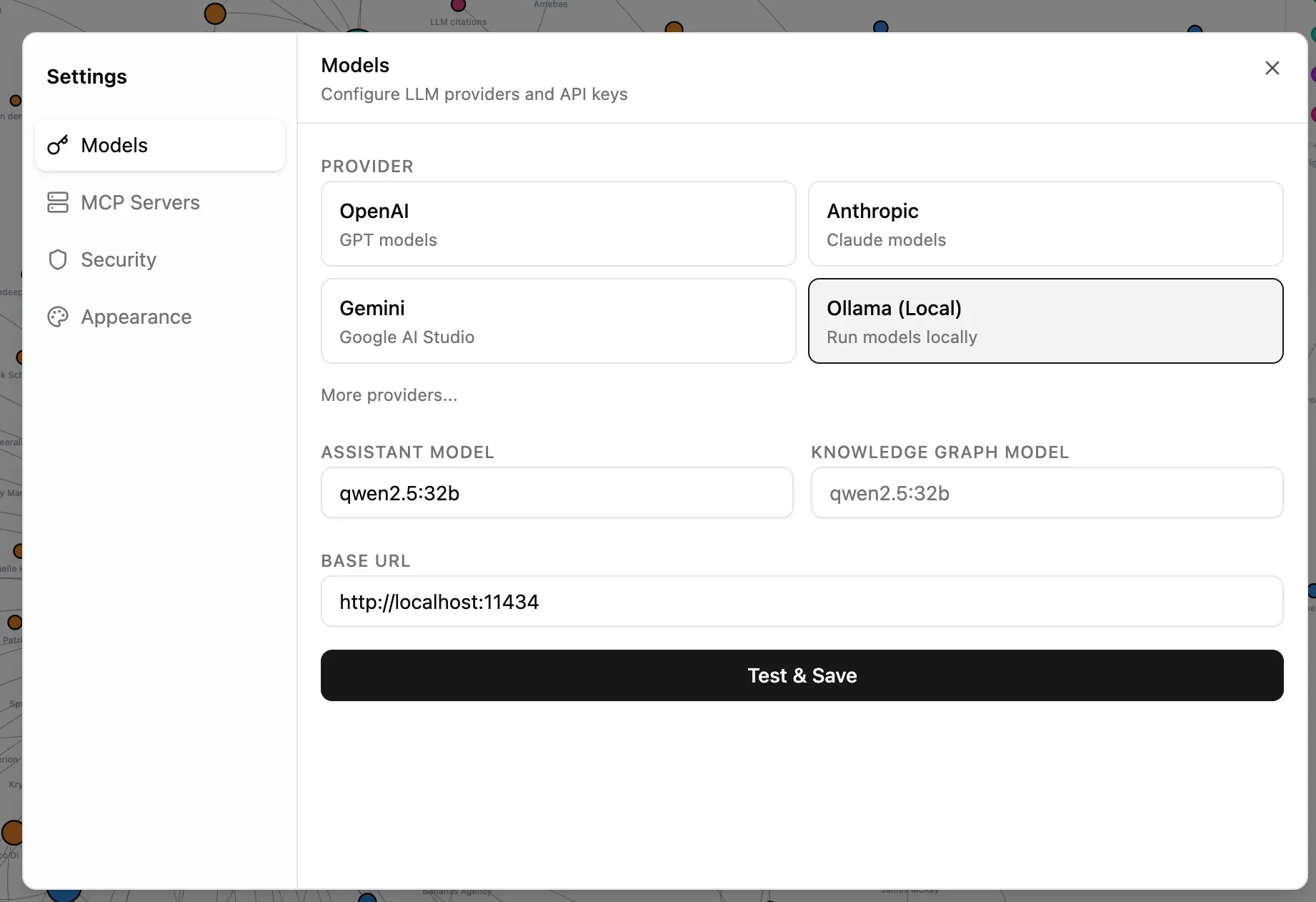
How to Set Up Ollama
- Download Ollama and install it
- Pull a model:
ollama pull llama3(or whatever model suits your hardware. I really like qwen2.5:32b ) - In Rowboat’s settings, select Ollama as your provider
- Point it to your local Ollama endpoint (usually
http://localhost:11434)
“
If you have a decent Mac with Apple Silicon (M1 or newer) or a PC with a modern GPU, a 7B parameter model will run smoothly. If you have 32GB+ of RAM, you can comfortably run larger models that approach cloud quality. Check and ensure your machine can handle the local models comfortably.
My honest take: I’d use Ollama for the background graph building (which runs constantly and is token hungry) and switch to Claude or GPT when you need something that requires serious reasoning, like drafting a nuanced email or analyzing a complex situation. Rowboat lets you swap models without losing any data.
Step 3: Connect Your Data Sources
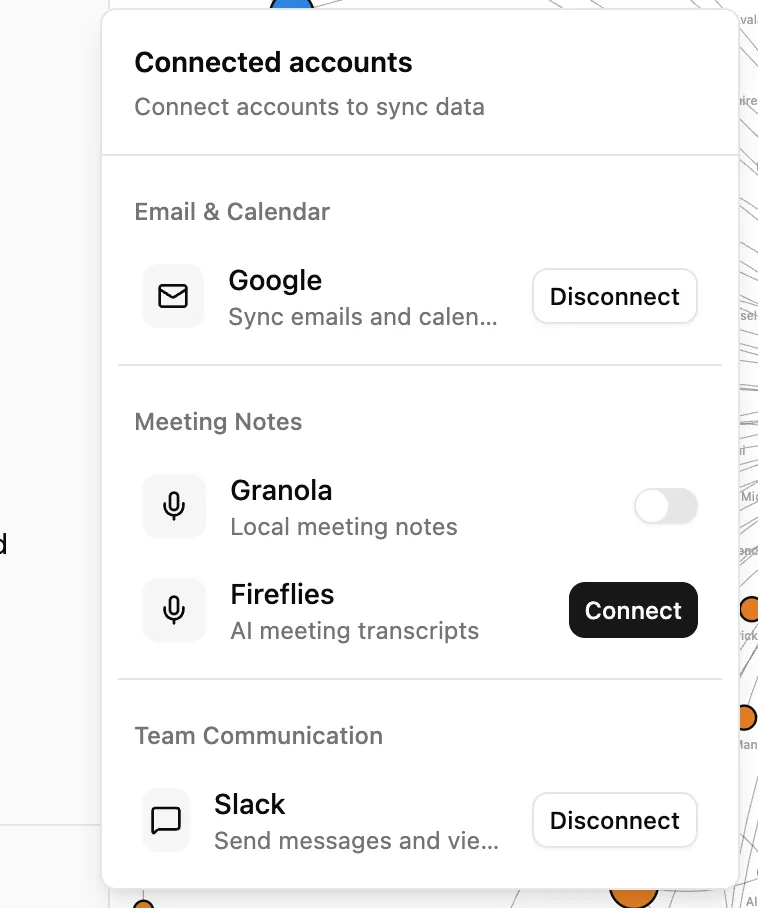
This is where Rowboat starts becoming useful. Go to the Connected Accounts section and link:
Gmail: Uses OAuth (secure sign in, Rowboat never sees your password). It syncs your emails every 5 minutes and starts building the knowledge graph from your conversations. Currently read only, which is actually a good thing from a safety perspective.
Google Calendar: Syncs your events and attachments. This is what powers the meeting prep feature.
Meeting Notes: Connects to Granola (5 minute sync) or Fireflies (30 minute sync) for meeting transcripts. If you use either of these tools, the integration means your meeting context flows automatically into the graph.
Slack: Syncs all your slack conversations.
“
Step 4: Let It Cook

Here’s the part that requires patience. Once you’ve connected your sources, Rowboat needs time to build the graph. It processes your emails and meetings in batches, extracting people, organizations, projects, and topics.
Give it 2 to 5 days of running in the background. (I had large amounts of data so i let it cook for few weeks)
The graph starts sparse and gets richer over time. After a week, it’s genuinely useful. After a month, it’s indispensable.
The MCP Superpower
This is the part that gets me properly excited.
MCP stands for Model Context Protocol. In plain English, it’s a way to give your AI assistant access to external tools. Think of it like installing apps on your phone, except you’re installing capabilities into your AI assistant.
Rowboat supports MCP out of the box, which means you can connect it to:
Communication tools:
- Slack for reading and sending messages in your workspace
- Twitter/X for monitoring mentions or posting updates
Development tools:
- GitHub for managing repos, issues, and pull requests
- Linear and Jira for project management and issue tracking
Research tools:
- Exa for intelligent web search
- Brave Search for web research
Creative tools:
- ElevenLabs for voice generation and audio content
SEO and Marketing tools (this is where it gets interesting for me):
- Ahrefs MCP for pulling backlink data, keyword research, and site audits directly into your workflow
- DataForSEO for SERP data and keyword metrics
Why MCP + Knowledge Graph Is a Killer Combination
Here’s a concrete example. Say you’re preparing a pitch for a potential client. Without Rowboat, you’d:
- Open Gmail and search for past emails with them
- Open Ahrefs and pull their site metrics
- Open your meeting notes to check what was discussed
- Open a Google Doc and start writing
With Rowboat and MCP tools connected, you just say: “Build me a pitch brief for the meeting with James at Company X. Include their current SEO metrics from Ahrefs and reference what we discussed in our last call.”
Rowboat already knows James (from your emails), knows Company X (from the knowledge graph), can pull fresh data from Ahrefs (via MCP), and remembers your last meeting (from Granola or Fireflies sync). One prompt. Done.
Setting Up MCP Tools
MCP configuration lives in ~/.rowboat/config/mcp.json. Here’s what a setup with Ahrefs and ElevenLabs might look like:
{
  "servers": [
    {
      "name": "ahrefs",
      "command": "npx",
      "args": ["mcp-ahrefs"]
    },
    {
      "name": "elevenlabs",
      "command": "npx",
      "args": ["mcp-elevenlabs"]
    },
    {
      "name": "slack",
      "command": "npx",
      "args": ["mcp-slack"]
    }
  ]
}
Each MCP server is a small program that Rowboat discovers at startup. The growing MCP ecosystem means new tools are being added constantly without Rowboat itself needing updates.
Real Use Cases (What I Actually Use It For)
Let me walk you through how this fits into my actual work week.
Meeting Prep
This is the killer feature. Before any meeting, I ask Rowboat to build me a brief. It pulls together:
- Who I’m meeting and our recent communication history
- What projects we’re working on together
- Any open commitments or decisions from previous conversations
- Relevant context from emails I might have forgotten about
For someone running two companies with dozens of meetings a week, this alone makes it worth the setup time.
Email Drafting With Full Context
When I need to reply to a complex email thread, Rowboat doesn’t just see the current thread. It knows the full relationship context. It knows what this person works on, what we’ve agreed to in the past, and what’s currently in flight. The drafts it produces are significantly better than what you’d get from a generic AI email writer.
Project Tracking Across Conversations
Projects don’t live in one place. They’re scattered across emails, Slack messages, meeting notes, and documents. Rowboat’s graph connects all of this. I can ask “what’s the current status of the Reddit visibility pilot?” and get an answer that synthesises information from multiple sources.
Voice Notes That Update the Graph
Rowboat supports voice input via Deepgram transcription. Record a quick voice note after a meeting or while walking, and it automatically extracts entities and updates the knowledge graph. “Just had a call with Sarah. She confirmed the Q2 budget is approved and wants to kick off the integration project next month.” That creates or updates nodes for Sarah, the Q2 budget, and the integration project. I haven’t had a chance to test this feature yet. I will update this article when i have done so.
SEO Workflow With MCP
With Ahrefs MCP connected, I can do things like:
- “Pull the top 10 organic keywords for client X’s competitor and summarise what content gaps we should target”
- “Check if any of our client sites lost significant referring domains this week”
- “Generate a brief for the content team based on keyword opportunities in the graph for Project Y”
The knowledge graph means Rowboat already knows which clients I work with and what their projects are. The MCP tools give it access to real time data. Combined, it’s like having an analyst who knows your business intimately.
The Privacy Argument (And Why It Matters)
I want to be direct about this because it’s genuinely important.
Everything Rowboat stores lives in ~/.rowboat/ on your machine. Plain Markdown files. No proprietary database. No cloud sync (unless you choose to set one up). No vendor lock in. You can open the entire knowledge graph in Obsidian if you want to browse or edit it visually.
This means:
- If you stop using Rowboat, your data is still yours in a universally readable format
- No company can change their terms of service and suddenly own your knowledge graph
- You can back it up, version control it, or encrypt it however you like
- You can audit exactly what’s being stored at any time
The model choice affects privacy too. If you use OpenAI or Anthropic APIs, your queries (including knowledge graph context) travel through their servers. If you use Ollama locally, literally nothing leaves your machine. For anyone handling sensitive client data, NDAs, or confidential business information, the local model option isn’t just a cost saver. It’s a compliance requirement. (For those dealt with enterprises in the past know exactly what I’m talking about)
This is fundamentally different from cloud AI tools like Notion AI, ChatGPT with memory, or Mem.ai, where your data lives on someone else’s servers governed by their terms.
The Honest Downsides
I like this tool, but I’m not going to pretend it’s perfect.
The graph takes time to become useful. The first few days, your knowledge graph will be noisy. Spam contacts, low signal entities, and miscategorised relationships. It gets better as the AI processes more data, but the early experience can be underwhelming.
Limited data sources currently. Gmail, Google Calendar, Granola, and Fireflies. That’s it for now. No Outlook, no direct Slack ingestion, no IMAP support. If you’re not in the Google ecosystem for email, you’re stuck waiting.
API costs can sneak up on you. If you run everything through GPT or Anthropic without paying attention, the continuous background processing can rack up a bill. Please watch out and you have been warned. This is why I’m emphatic about starting with Ollama. Use cloud models for the things that need them, not for background entity extraction.
The product is still young. Rowboat Labs is a three person team (all engineers from Y Combinator Summer 2024). They pivoted from a multi agent IDE to the current personal AI coworker concept. Three people building desktop, web, and CLI apps simultaneously means things move fast but some rough edges remain.
Security considerations. The built in tools include file system access and potentially shell command execution. The team is cautious (Gmail is deliberately read only), but it’s worth understanding what level of access you’re granting.
Who Built This?
Credit where it’s due. Rowboat is built by Rowboat Labs, a Y Combinator Summer 2024 startup founded by Arjun Maheswaran, Ramnique Singh, and Akhilesh Sudhakar. All three previously co-founded Agara, a customer support AI startup that was acquired by Coinbase in 2021. They’ve worked together for over 7 years.
The project is open source under the Apache 2.0 license, has 9,000+ GitHub stars, and an active community contributing improvements.
GitHub repo: github.com/rowboatlabs/rowboat
Should You Try It?
If you meet these criteria, yes:
- You spend significant time in emails and meetings
- You work across multiple projects and clients
- You’re tired of re-explaining context to AI tools every session
- You care about data privacy and want your information stored locally
- You’re comfortable with a product that’s still evolving (and you can shape with feedback)
The setup takes about 30 minutes. The graph takes a week to become genuinely useful. And once it is, going back to stateless AI tools feels like going back to a phone without contacts.
I’m still exploring what’s possible with this tool. Every week I find a new way to use the MCP integrations or a new pattern that the knowledge graph enables.
If you end up trying it, let me know what you build. I’m genuinely curious how other people use this.
Resources
- Rowboat GitHub Repository (open source, Apache 2.0)
- Rowboat Documentation
- Ollama (free local model runner)
- MCP Servers Directory (browse available integrations)
- Obsidian (compatible knowledge graph viewer/editor)
- Hacker News Discussion (community feedback and team responses)
You might also like
Stay in the loop
I'll email you when I publish something new. No spam. No fluff.
Join other readers. Unsubscribe anytime.

Entrepreneur & Search Journey Optimisation Consultant. Co-founder of Keyword Insights and Snippet Digital.