How to Unlock "Not Provided" Keywords in Google Analytics
The 3 ways to recover your organic keyword data after Google hid it in 2013. Search Console linking, BigQuery pipelines, and third party tools compared honestly. Includes a free open source skill whose methodology is fully inspectable, the opposite of the paid black boxes.

Co-founder of Snippet Digital
20 min read · 97 views · Some assembly required
Key points
- GA4 did not fix not provided, it removed the column. The query is still hidden upstream in Google's encryption and no analytics tool can read it.
- The Search Console link in GA4 only lines the two datasets up at page level. Your queries never join to conversions or revenue, which is the join everyone actually wants.
- The BigQuery route gets closest: both exports into one project, joined on landing page, for an hour or two of setup and nothing on the free tier.
On this page 10 sections
- What “not provided” actually means
- Why Google hid your keywords in the first place
- Why GA4 did not fix it
- The 3 ways to get most of it back
- Option 1. Link Search Console to Google Analytics 4
- Option 2. Build a BigQuery pipeline (free, open source)
- Option 3. Third party tools that decrypt “not provided”
- Which option should you pick
- What you still cannot recover
- The larger point
“(not provided)” used to fill the keyword column in your Google Analytics reports. It ran at 80% to 95% of your organic traffic depending on the site, and for every SEO who started before 2014, it was the single most familiar piece of data in the dashboard.
GA4 went a step further. There is no keyword column to fill. The keyword dimension that Universal Analytics carried (with “(not provided)” sitting on top of it) was dropped entirely. Open GA4’s Search Console section and you get queries without conversions. Open any other report and you get conversions without queries. The keyword data your reports used to show, even partially, is just gone.
This is damage from a decision Google made in 2011 and completed in 2013. Every SEO has lived with it since. And every new starter in our industry asks the same question within their first month. Why can’t I see which keywords drove this page’s traffic?
You can see most of it. Here’s what happened, why GA4 didn’t fix it, and the 3 ways to get most of the data back.
What “not provided” actually means
When someone searches Google and clicks through to your site, the browser normally passes the search query to your site via the referrer header. Google Analytics reads that header and attributes the visit to a specific keyword. For the better part of a decade, that was how keyword-level organic data worked.
Then Google stopped passing the search query in the referrer. A visit from a user signed into a Google account on an HTTPS connection still showed up as coming from Google, but arrived with the search term stripped out. Universal Analytics had nowhere to read the keyword from, so it logged the visit as “(not provided)” and moved on. That label sat on top of around 80 to 95% of organic traffic for the rest of UA’s life.
When GA4 replaced UA, Google quietly dropped the keyword dimension altogether. There is no “(not provided)” in GA4 because there is no keyword column to put it in. The label is gone but the problem it represented is exactly the same. The query is hidden upstream in Google’s encryption. No analytics tool can read it. UA showed you the gap and labelled it. GA4 just removed the column.
The phrase “(not provided)” has since become shorthand for the entire category of organic visits where Google has hidden the query. It is still the term every SEO uses when they search for the problem, even if their analytics tool no longer prints the words. You can still see the landing page, the device, the country, and the session behaviour. You just cannot see the search term.
Why Google hid your keywords in the first place
Google’s official reason was user privacy. A signed-in user performing a search on HTTPS should not have their query exposed to third party sites, they argued. Whether you believe that was the real motive is your call. The timing coincided with the launch of Google’s paid ads data still including keywords, which many in the industry saw as less about privacy and more about nudging SEOs toward AdWords.
The rollout happened in stages. October 2011 covered signed-in users only, which was maybe 10% of organic traffic at the time. September 2013 extended it to all searches regardless of login state. Within weeks, most websites saw their keyword reports collapse into one giant (not provided) bucket and some long tail that accounted for the remainder.
Nothing has changed since. Every tool that claimed to “solve” not provided did so by working around it, not undoing it.
Why GA4 did not fix it
When Google announced GA4 would replace Universal Analytics, a reasonable person assumed the new platform might finally address the gap. GA4 has a direct Search Console integration, right there in the admin settings. You can link your Search Console property to your GA4 property and suddenly see query data appear in GA4 reports.
The integration is useful. It also does not give you what you actually want.
The Search Console integration in GA4 is read only at the reporting layer. You see clicks, impressions, CTR, and position against queries. You cannot join those queries to conversions, to events, to revenue, to engagement, or to any of the metrics GA4 actually tracks for the rest of your traffic. GA4 will line the two up at the landing page level, its Google Organic Search Traffic report sits Search Console clicks and position next to metrics like engaged sessions, but it never joins your search queries to those numbers. At the query level, the one you need for revenue, the two datasets sit side by side and never touch.
So when someone asks “which organic keyword drove the most revenue last quarter,” GA4 still has nothing to say. Neither does Search Console. The answer requires joining the two datasets, and the platforms deliberately will not let you.
This is also why Looker Studio blending of GA4 and Search Console does not work. You can build the blend, the interface will let you drag both sources into the same chart, and the result will show you everything except the one thing you care about. You can drag conversion metrics into the blend, but only against the landing page, never against a query, because GA4 has no query dimension to attach them to. The chart renders. The join you actually need does not exist. Tested this across multiple clients. Every time, same dead end.
The 3 ways to get most of it back
None of these fully replaces the old UA keyword report. Each one gets you closer, with different trade-offs around effort, cost, completeness, and where the data lives. Pick based on what you actually need, not what sounds most impressive in a client deck.
Option 1. Link Search Console to Google Analytics 4
This takes 5 minutes to set up, costs nothing, and covers only part of the picture.
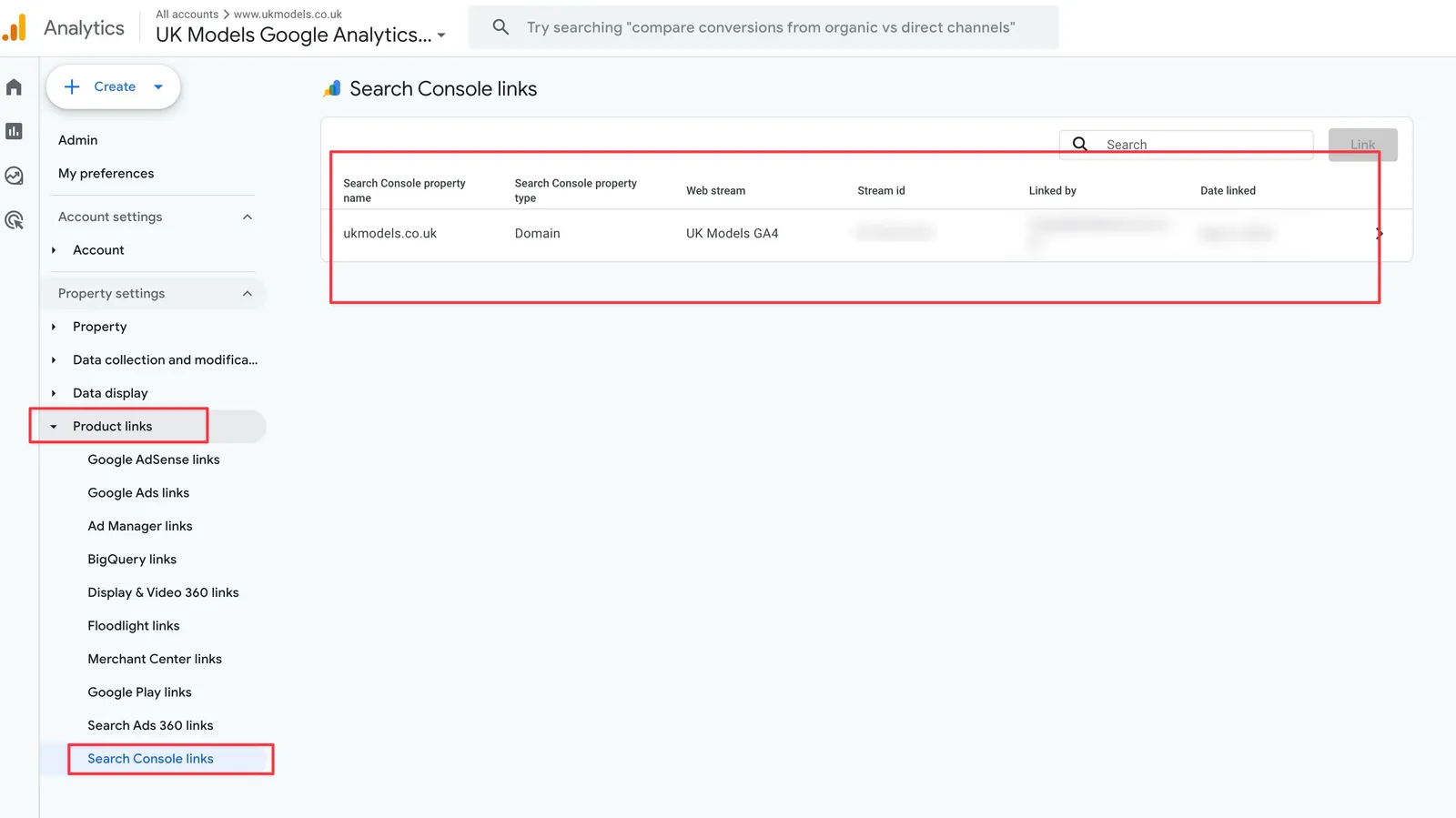
Go into GA4 admin, scroll to “Product links,” select Search Console links, and connect your verified property. GA4 will start populating two new reports. Queries and Google organic search traffic. Both live under the Search Console section in the reports sidebar.
You get query level clicks, impressions, CTR, and average position, matched to landing pages. You do not get conversions, revenue, engagement, or any GA4 event data joined against those queries. That limit is the reason so many SEOs assume this is useless and skip it entirely.
It is not useless. For content planning, title optimisation, and identifying striking distance keywords, the data is good enough. You just cannot use it to answer commercial questions.
Best for anyone who does not have the time or technical chops to build a data warehouse. Especially useful for freelancers and in-house content marketers who need query data for strategy and do not need to attribute revenue. If your work is mostly organic traffic diagnosis rather than keyword level ROI, this covers 80% of your needs in 5 minutes of setup.
Option 2. Build a BigQuery pipeline (free, open source)
This takes 1 to 2 hours to set up and gives you the most complete answer you can build yourself. BigQuery’s free tier (10 GB of storage and 1 TB of queries a month, with no expiry) covers a typical site for nothing. You only start paying once your stored export outgrows the free 10 GB, which works out around £5 to £20 a year if it ever does.
Both GA4 and Search Console offer native BigQuery exports. Enable both. Your GA4 event data and your Search Console click data land in the same BigQuery project, and from there you can write SQL that joins them on landing page URL. The result is the report Google should have built into GA4 in the first place: clicks, impressions, position, and rankings on the left; sessions, engagement, conversions, and revenue on the right. All against the same query, on the same page.
The pipeline has 2 layers. The first gets it running with a ready-made tool. The second improves the accuracy with a skill on top. Most people will set up the first, see the output, and decide whether they need the second.
Step 1. Set up BigQuery + GA4 + GSC + the BigQuery MCP server
You need 4 things in place. Each is a one-time setup.
- A Google Cloud project with BigQuery enabled. Free tier is enough for typical sites.
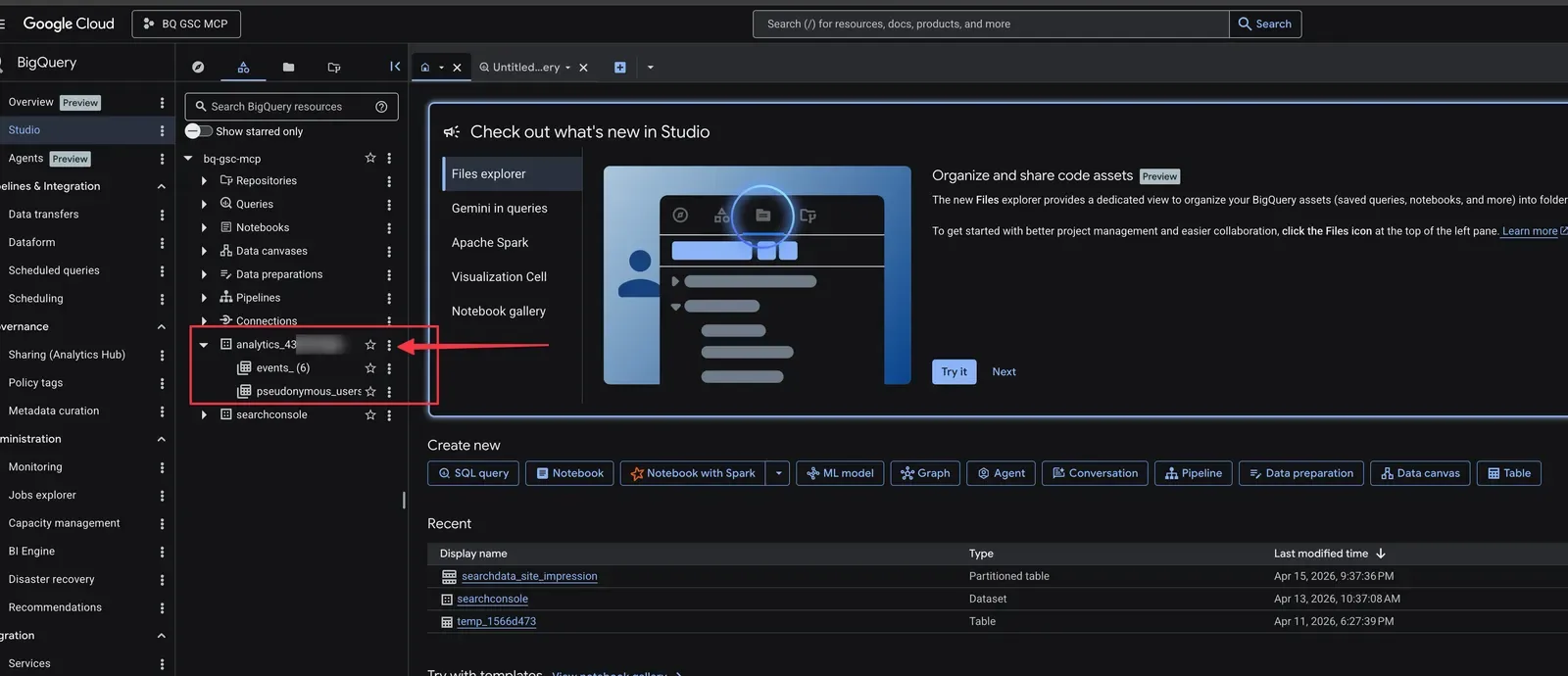
- GSC bulk export to BigQuery. Search Console > Settings > Bulk Data Export. Pick your Google Cloud project. The first export takes around 48 hours. The dataset defaults to the name
searchconsole. Worth knowing before you start, the export does not backfill. It only captures data from the day you set it up forward, so you cannot analyse last month until a month has passed. For history before setup, pull it from the Search Console API or the Performance reports instead. - GA4 BigQuery export to the same Google Cloud project. GA4 > Admin > Product Links > BigQuery Links. Daily export is fine. The dataset will be called
analytics_XXXXXXXXXwhere the number is your GA4 property ID. First batch takes 24 to 48 hours. - The BigQuery MCP server connected to Claude Desktop or Claude Code. Service account with BigQuery Data Viewer access on both datasets. The full step by step setup is in the BigQuery MCP server guide including the service account roles, IAM permissions, and example queries.
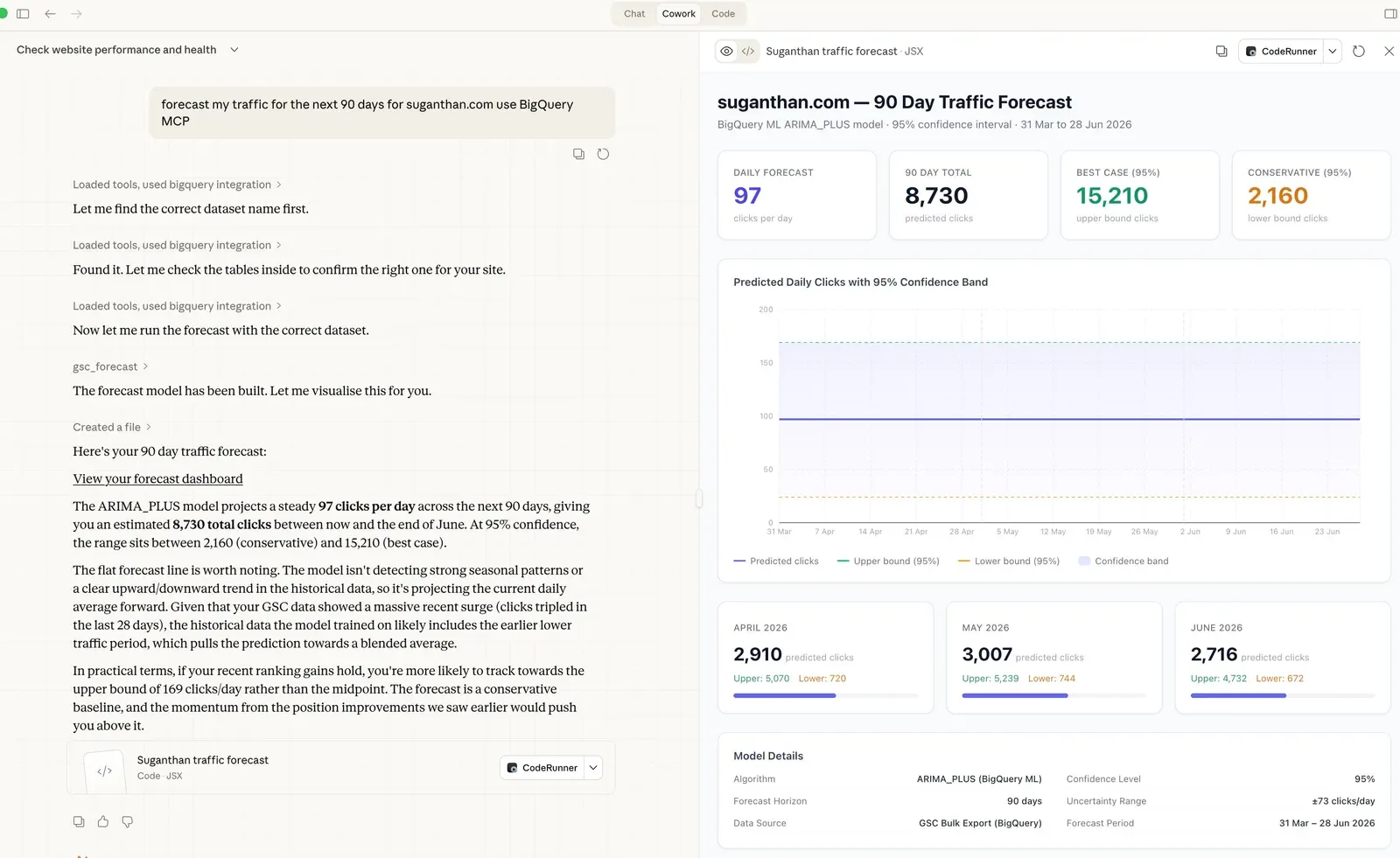
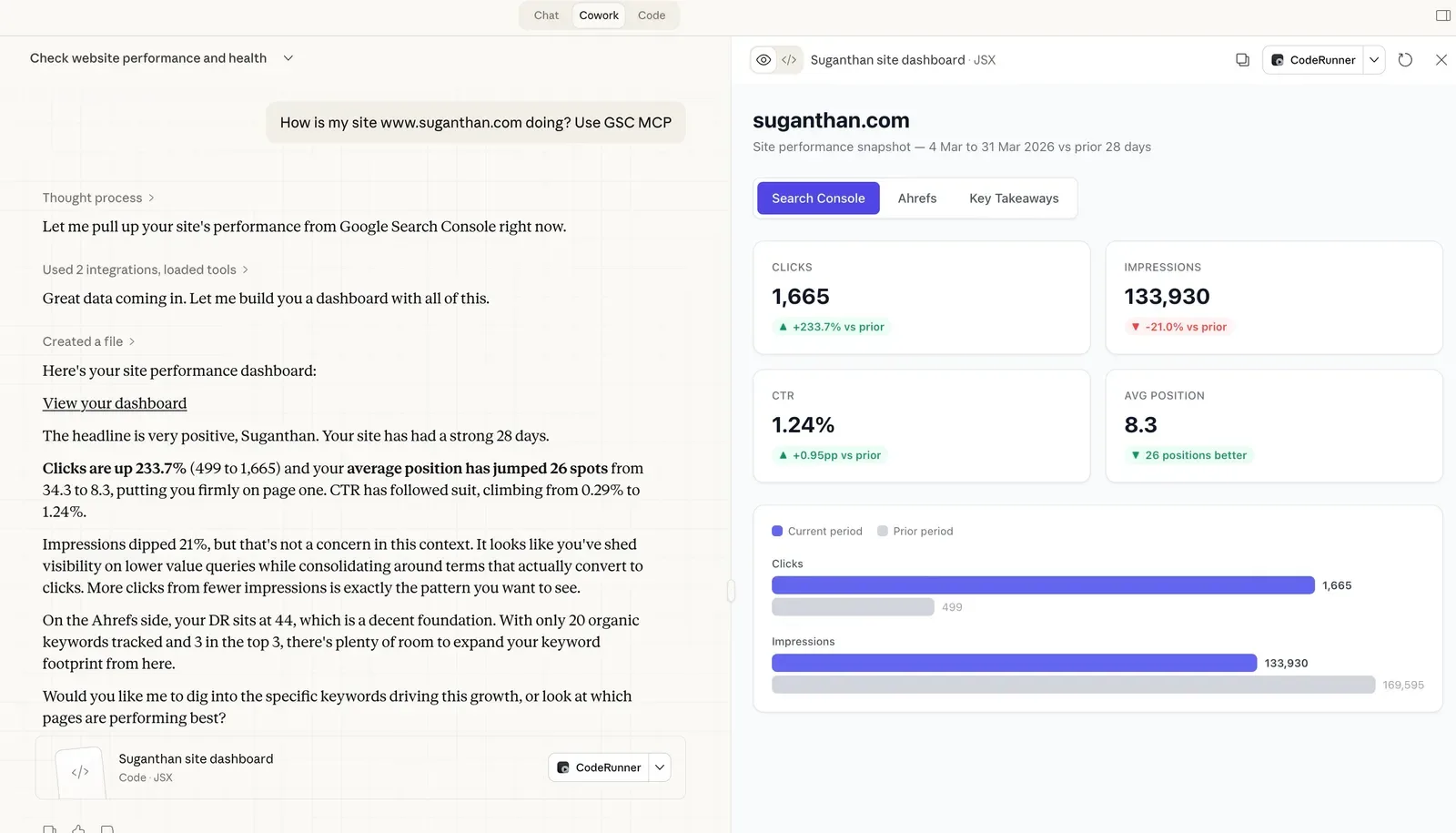
Once those 4 pieces are running, you can ask Claude questions in plain English and the MCP server runs SQL across both datasets for you.
Step 2. Use the prebuilt revenue matching tool
The BigQuery MCP server ships with 6 prebuilt GA4 + GSC tools. The one most people care about is ga4_gsc_query_revenue. Ask Claude:
Which keywords generated the most revenue last month?
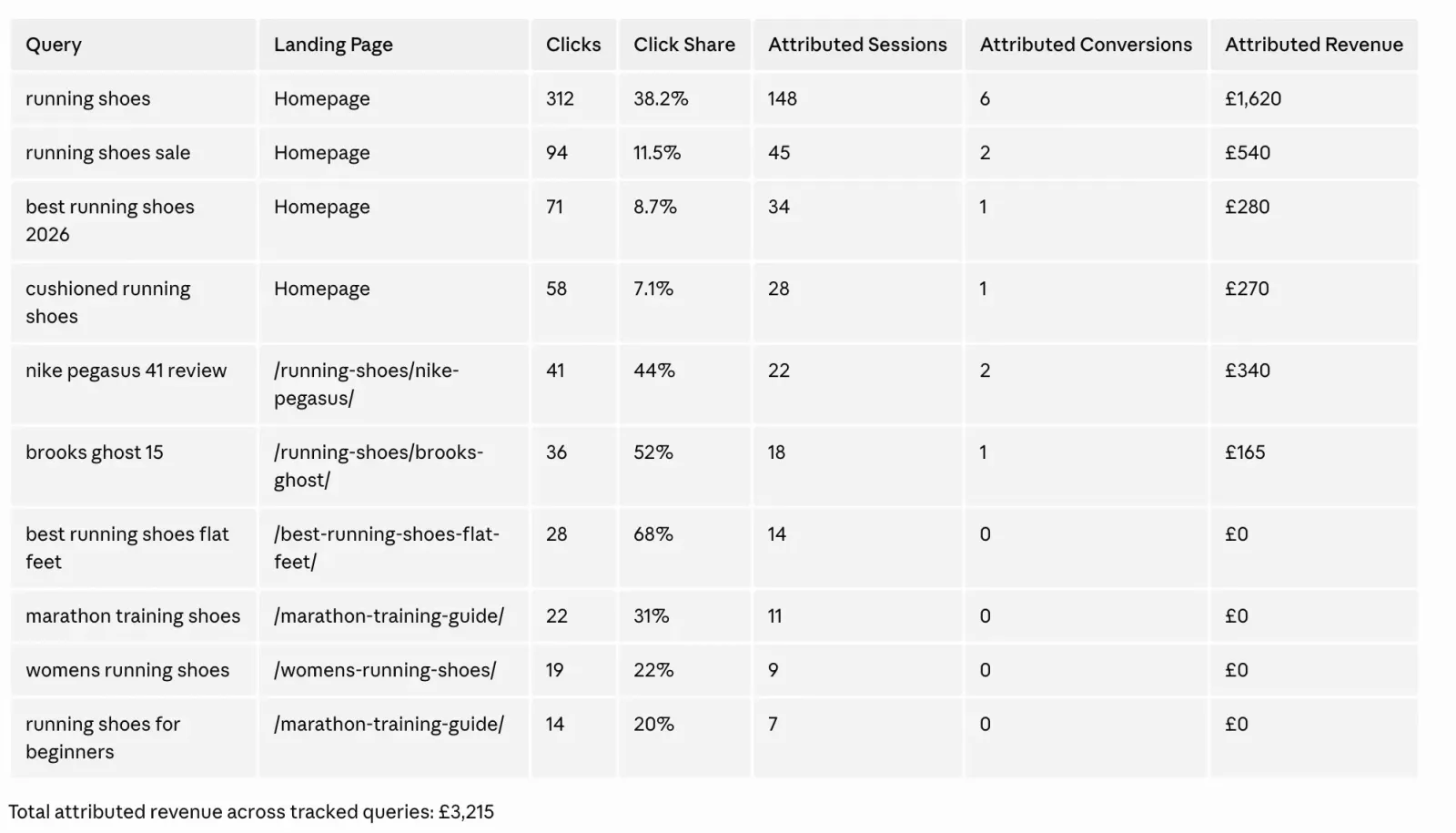
The tool joins GSC clicks with GA4 conversions and revenue at the landing page level, distributes the page’s revenue across its queries by click share, and returns a sorted table of attributed revenue per keyword. The other 5 tools cover content ROI diagnosis, position value modelling, snippet mismatch detection, branded vs non-branded performance, and combined page-level reporting. Full details in the GA4 + GSC in BigQuery post.
Strengths of the prebuilt revenue matching tool:
- One question, one answer. No SQL writing.
- Handles URL normalisation, JOIN logic, and timezone differences automatically.
- Ships with sensible defaults that work without configuration.
- Free, open source, and visible (you can read the SQL the tool runs).
- Returns results in a few seconds.
Weaknesses (being fully honest about these):
- Uses proportional click share at the landing page level. If “best running shoes” got 80% of clicks to /running-shoes/ and “trail running shoes” got 20%, the page’s revenue gets split 80/20 between them. That assumes every click on the page converts at the same rate. It does not. A branded click probably converts at 3 times the rate of an informational click.
- Ignores signals you already have. Same landing page on mobile gets different queries from desktop. Tuesday clicks cannot have caused Friday conversions. The tool joins on landing page only, throwing away device and date.
- No confidence per row. Every attributed number looks equally trustworthy in the output. They aren’t. The home page with 19 candidate queries has way fuzzier attribution than a long-tail page with 1 dominant query, but the table doesn’t tell you that.
- No intent classification. Branded, transactional, commercial, and informational queries all get the same weight, which understates branded revenue and overstates informational.
For most users this is good enough. You get keyword-level attribution that’s better than guessing, the data is in your warehouse, and you can iterate. If you want to push the accuracy further, that’s where the skill comes in.
Step 3. Install the multi-signal skill on top (better accuracy)
This is the level up. A free open source skill that takes the same BigQuery pipeline and runs a more careful attribution on top. Same setup, data and MCP server. Better methodology.
Why the skill is more accurate
Three reasons, mapped to the 3 weaknesses of the prebuilt tool.
Reason 1: It narrows the candidate set by 3 signals before distributing revenue. For each GA4 session on /running-shoes/, the skill only considers GSC queries that match all 3 of: same landing page, same date, same device. A click on mobile on April 3 cannot have caused a desktop session on April 5. The skill enforces this. The prebuilt tool ignores it and joins on landing page alone. The narrower candidate set means each query gets a more accurate share of the page’s actual sessions and revenue. Country looks like an obvious fourth signal, but Search Console stores it as an ISO code and GA4 stores it as a full country name, so the two will not join cleanly. Rather than fake a match, the skill leaves country out.
Reason 2: It weights by search intent before normalising. The skill classifies each query into one of 5 intents (branded, transactional, commercial, navigational, informational) and applies a multiplier reflecting typical conversion rate ratios:
- Branded: 3.0x (people searching your brand convert at the highest rate)
- Transactional: 2.0x (“buy”, “demo”, “price” intent)
- Commercial: 1.5x (“best”, “review”, “vs” research intent)
- Navigational: 1.0x (“login”, “contact” already-using-your-site intent)
- Informational: 0.5x (long-tail “what is”, “how to” learning intent)
After weighting, the skill renormalises within each landing page so the total attributed revenue still equals the page’s actual GA4 revenue. The weighting redistributes credit across queries. It does not invent revenue that wasn’t there. One honest caveat about that renormalisation. It spreads the page’s entire GA4 total across only the queries you can see, so if a chunk of that page’s revenue actually came from anonymised or unmatched queries, that share gets pushed onto the visible ones. A visible query can end up credited with a little revenue that really belonged to a hidden one. The page-level total stays correct. The per-query split is a best estimate, not ground truth.
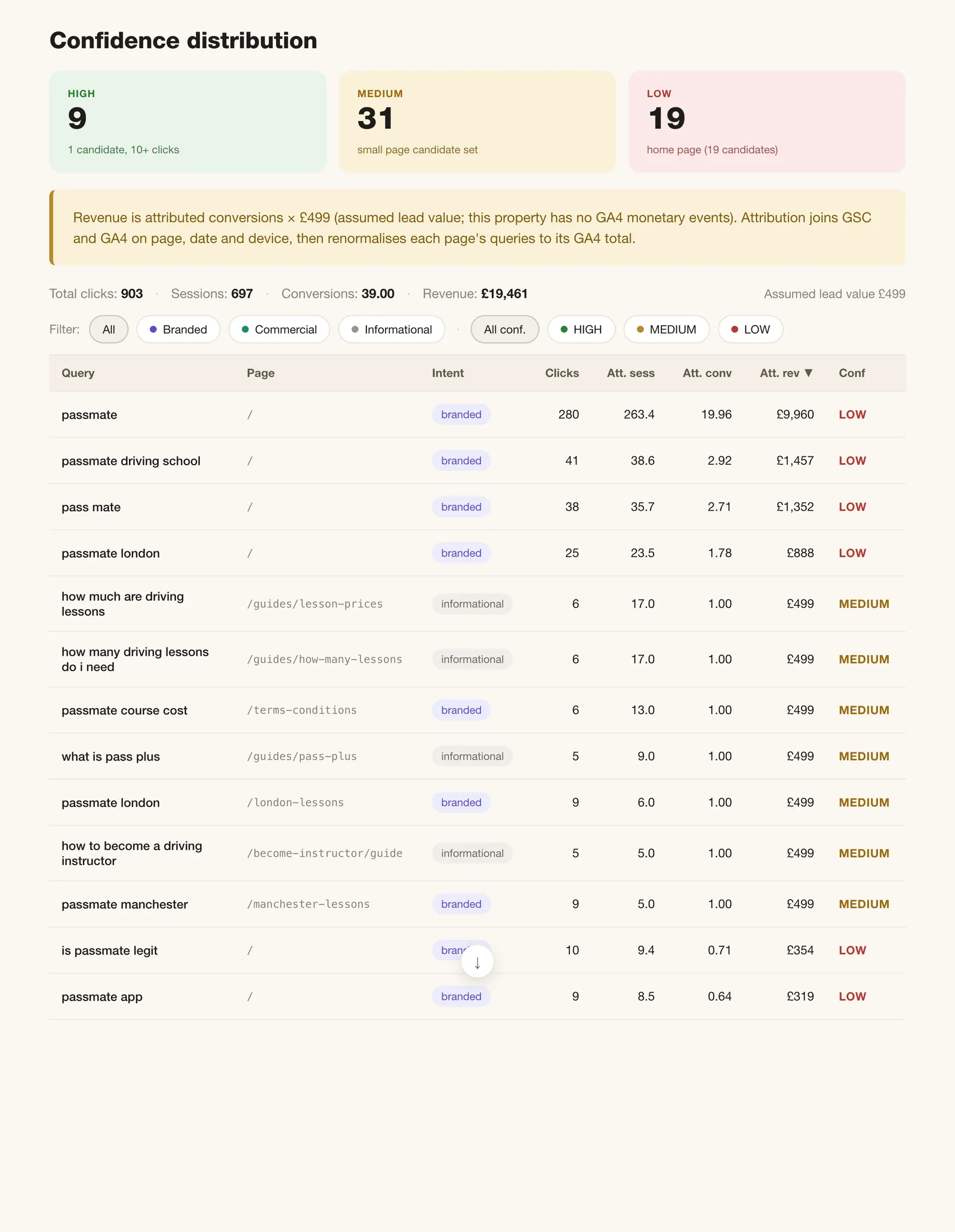
Reason 3: It scores confidence per row. Each attributed keyword comes back with HIGH, MEDIUM, or LOW confidence:
- HIGH: 1 to 3 candidate queries on the page and 10+ clicks. Attribution is close to deterministic.
- MEDIUM: anything between the two. Reasonable confidence.
- LOW: 11+ candidates, or fewer than 5 clicks. Treat as directional only.
Sort by confidence. Trust the HIGH rows. Discount the LOW rows. It is a number the paid black-box tools do not show you at all.
What the output looks like
Synthetic example based on a typical mid-sized SaaS site (project management tool, GA4 with subscription revenue events, GSC bulk export, 28 day window):
| Query | Page | Intent | Clicks | Att. Conv | Att. Revenue | Confidence |
|---|---|---|---|---|---|---|
| projectflow pricing | /pricing | branded | 168 | 28.4 | $6,820 | HIGH |
| projectflow | / | branded | 412 | 41.6 | $9,985 | LOW |
| best project management software | /comparison | commercial | 218 | 7.2 | $1,180 | MEDIUM |
| buy project management software | /pricing | transactional | 45 | 5.1 | $640 | HIGH |
| what is a kanban board | /blog/kanban-explained | informational | 412 | 0.9 | $48 | HIGH |
Note the contrast. “projectflow” pulls 412 clicks but scores LOW confidence because 19 other queries are also fighting for the home page. The prebuilt tool would happily report $9,985 attributed to “projectflow” with no warning. The skill flags it as LOW so you know not to bet a budget on that number. “projectflow pricing” pulls less than half the clicks but is HIGH confidence because the pricing page has only 6 candidate queries. “what is a kanban board” pulls 412 clicks but generates almost no revenue, the actual ROI of top-of-funnel content laid bare.
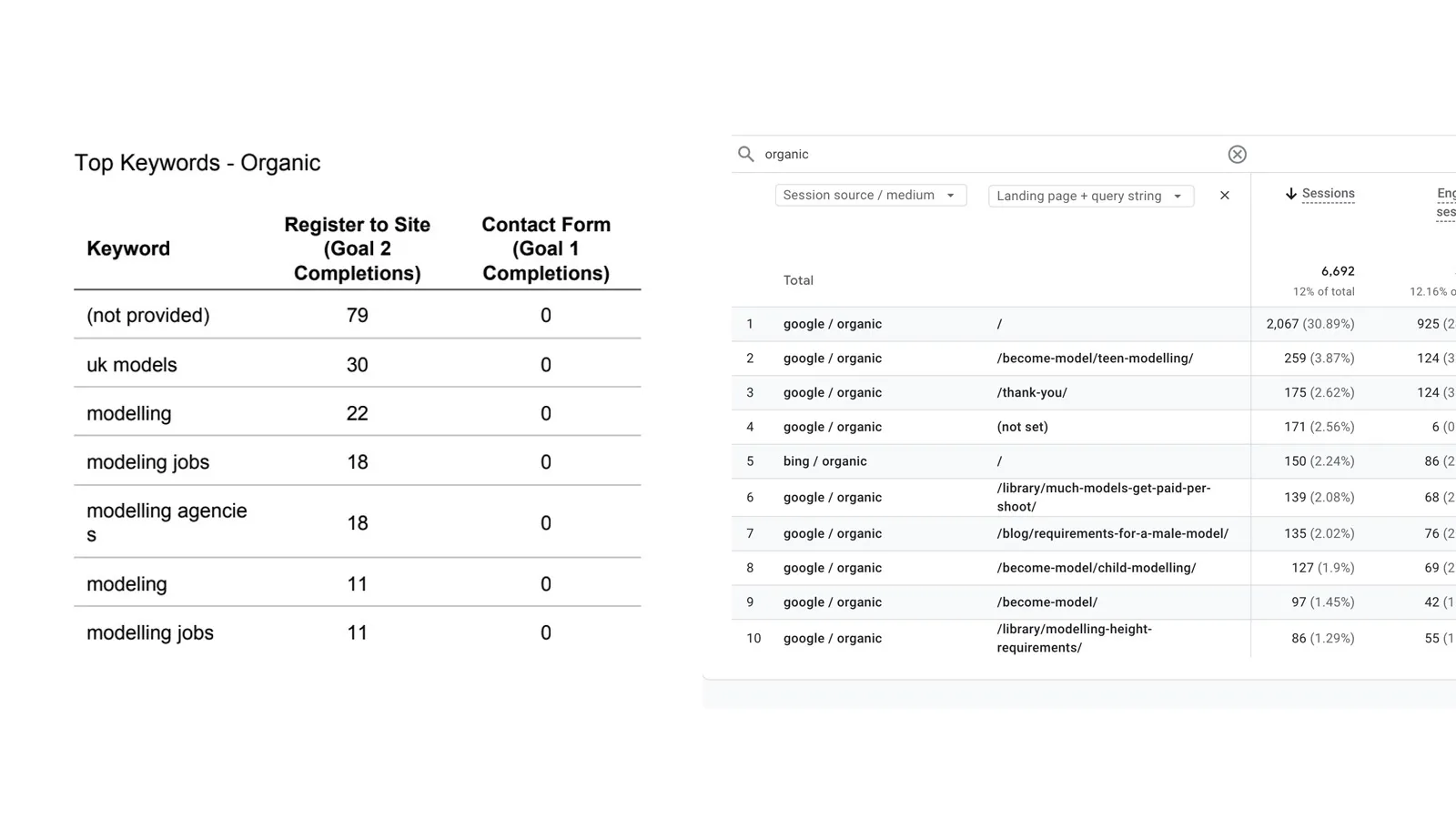
Here is a real world dataset example
How to install and use the skill
Clone the skill into your Claude Code skills directory:
git clone https://github.com/Suganthan-Mohanadasan/multi-signal-keyword-attribution.git ~/.claude/skills/multi-signal-attributionOr if you don’t use Claude Code skills, download attribution.sql from the repo and run it directly in the BigQuery console.
Configure your brand. The skill uses 3 tiers for brand classification. Tier 1 catches canonical brand forms via substring match. Tier 2 catches word-order and stem variations via token-prefix matching. Tier 3 excludes false positives for ambiguous single-word brands. Worked examples for common brand types (Coca-Cola, Stripe, ecommerce, lead-gen) are in the repo README.
Then in Claude with the BigQuery MCP server connected:
Run a multi-signal keyword revenue attribution analysis on my data.
Brand terms: ['mybrand', 'mybranddotcom']
Brand tokens: ['my', 'brand']
GSC dataset: searchconsole
GA4 dataset: analytics_XXXXXXXXX
Days: 28
Conversion events: ['form_submit', 'generate_lead', 'purchase']
The skill takes 1 to 3 minutes on a typical site. BigQuery cost is around $0.05 per run.
The full source, parameterised SQL, skill manifest, and tuning guide is at github.com/Suganthan-Mohanadasan/multi-signal-keyword-attribution.
Read the SQL
The full 323 line attribution query is in the GitHub repo. Every assumption (intent multipliers, brand matching tiers, conversion event names, confidence thresholds) is exposed in the DECLARE block at the top. Tweak whatever doesn’t fit your site.
- Browse on GitHub: attribution.sql
- Raw download:
curl -o attribution.sql https://raw.githubusercontent.com/Suganthan-Mohanadasan/multi-signal-keyword-attribution/main/attribution.sql
GitHub is the canonical source. If I update the methodology, the file there updates too. I’d rather you read one version that stays current than a copy in this article that drifts out of date.
When to use which
| Situation | Use the prebuilt tool | Use the skill |
|---|---|---|
| Quick answer in 30 seconds | ✅ | |
| Reporting headline numbers to a client | ✅ | |
| You want to know which numbers to trust | ✅ | |
| Your branded queries are mostly on the home page (high competition) | ✅ | |
| You need to defend the methodology to a CFO | ✅ | |
| You want to tune the intent multipliers to your data | ✅ | |
| Mixing 1-signal and 3-signal results in the same report | ✅ |
Both run on the same BigQuery pipeline. You can use the prebuilt tool for fast checks and the skill for deeper analysis. They are not mutually exclusive.
Best for SEOs who are happy to set up the BigQuery pipeline once and want the most defensible attribution they can build. After the pipeline is running, you can query it forever. The data is yours. You are not paying a subscription for it, and nothing gets deleted if a SaaS tool shuts down.
Option 3. Third party tools that decrypt “not provided”
This takes minutes to set up, costs anywhere from nothing to around $149 a month depending on traffic, and the completeness varies by tool.
Tools like Keyword Hero and a handful of smaller SaaS products promise to “unlock” not provided keywords. They do this by pulling your Search Console data and matching it to your GA4 landing pages using probabilistic algorithms. Keyword Hero says it matches 93% of your keywords on average, applying an 83% minimum certainty threshold below which a guess stays “(not provided)”. That sounds impressive until you think about what “certainty” even means when the ground truth is literally unmeasurable.
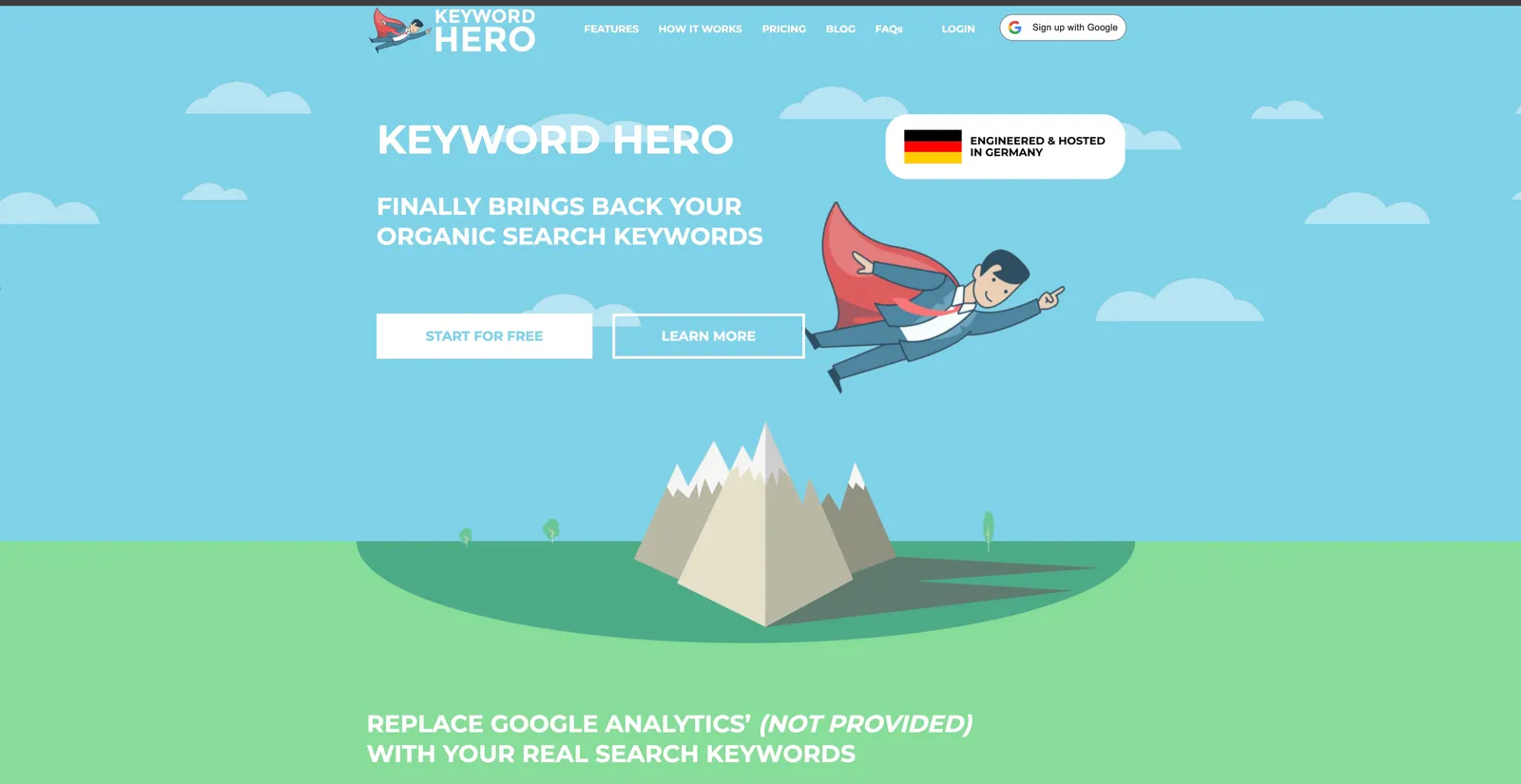
The honest assessment. These tools do more or less what Option 2 does in your own BigQuery, just inside their platform and for a monthly fee. They add machine learning on top to refine the proportional distribution. They hold your data and expect you to keep paying to keep seeing it. They do not show their work, so you cannot verify their methodology or argue with their assumptions.
The skill from Option 2 does the same job, with the same kind of probabilistic matching, except it is free, the SQL is on GitHub, and every assumption is exposed in a configurable DECLARE block at the top of the file. You can read the methodology. You can adjust the multipliers. You can argue with the confidence thresholds. You own the pipeline and the data.
Keyword Hero starts with a free tier, then runs from $9 a month to $149 a month, with custom pricing above that. Others lock behind enterprise tiers. Most stop processing new data the day you cancel, though data you have already exported may stick around, which is worth thinking about before you build a client reporting process around them.
Best for agencies or in-house teams that need the answers in 5 minutes and have budget for tools rather than time for setup. If you have more than 5 clients and absolutely cannot spare an afternoon to set up the BigQuery pipeline once, the monthly fee buys back your time. For most other situations, Option 2 wins on economics, transparency, and ownership.
Free vs paid comparison
| Keyword Hero | Supermetrics (DIY) | Multi-signal skill (Option 2) | |
|---|---|---|---|
| Cost | Free, then $9 to $149/mo | $29+/month | Free |
| Methodology | Black box ML | Connector only, you model it | 3-signal + intent + confidence |
| Confidence per row | None shown | None | HIGH/MEDIUM/LOW |
| Source visibility | Closed | Closed | Open source on GitHub |
| Setup time | 5 minutes | 15 minutes | 1 to 2 hours one-off |
| Data ownership | Theirs | Yours via export | Yours, in your BigQuery |
| Stops if you cancel | Yes | Export stays | Never |
Which option should you pick
| Your situation | Best option |
|---|---|
| Content marketer, just need query data for planning | Option 1 (GA4 Search Console linking) |
| SEO freelancer with a few clients, technical enough | Option 2 (BigQuery pipeline) |
| Agency managing 5+ clients, time is the bottleneck | Option 3 (third party tool) |
| In-house SEO at a data-mature company | Option 2 (BigQuery pipeline) |
| Someone who just needs to prove keyword ROI once | Option 3 short term, then Option 2 |
| Budget of zero and 2 hours to spare | Option 2 (BigQuery pipeline) |
There is no universal right answer. The only wrong answer is pretending Search Console links in GA4 give you everything you need, and then wondering why your client reports keep saying “traffic up 40%” but the CEO still asks “from which keywords?”
What you still cannot recover
Be honest with your clients and yourself about this. Even with the best setup, there is a hard ceiling.
Search Console hides a large chunk of your search traffic behind anonymised queries. Ahrefs put it at roughly 46% of clicks, 46.08% in their 2022 study of around 9 billion clicks, and 46.77% in a 2025 follow-up. That is a dataset-wide average, not a per-site constant. The proportion varies enormously between properties, from a couple of percent to over 90%, so any individual site can sit well outside it. These are mostly long tail searches with very low click counts, where exposing the query would identify individual users. Note this is a share of clicks, not of distinct queries. The share of unique queries hidden is higher still.
That 46% is gone. No BigQuery pipeline, no third party tool, no creative workaround gets it back. When you hear someone claim their tool “solves” not provided at 99% accuracy, they are either lying or measuring against the wrong ground truth. Even the GSC bulk export to BigQuery, which gives you more than the API, still respects the anonymisation threshold.
You can analyse the anonymised traffic in aggregate. Clicks per URL, CTR, average position for the anonymous queries as a whole. You just cannot know which individual queries made it up. For most reporting purposes that is fine, you just have to stop promising keyword level attribution on the long tail.
The larger point
“Not provided” is not going to get fixed. Google has had 13 years to reverse the decision and has not. GA4 was the last reasonable opportunity to restore keyword data to the default reporting experience, and Google instead chose to make the integration view only. Assume this is permanent.
The right response is not to keep hoping for a patch. The right response is to build your reporting workflow around what you can actually measure. Search Console has the queries. GA4 has the conversions. Join them yourself, in a place you control, using one of the 3 options above. Own the pipeline. Keep the data somewhere you control. Accept the anonymised slice that will never come back.
If you want the complete implementation walkthrough for Option 2, the GA4 + GSC in BigQuery post has every step including the setup script, service account roles, and 6 pre-built tools that answer the questions client reports actually need to answer. “Which keywords generate revenue.” “Which pages have the biggest gap between rankings and conversions.” “What is position 2 worth on my site.” The ones you’ve been guessing at for a decade.
For the more accurate version with confidence scoring, grab the multi-signal-keyword-attribution skill from GitHub. Same setup, better output, free. Pull requests welcome.
Google broke this in 2013. You can fix it now in about 2 hours.