GA4 + GSC in BigQuery: 6 Tools That Finally Answer "What Are My Keywords Worth?"
Connect Google Analytics 4 and Search Console data in BigQuery through Claude. Revenue per keyword, content ROI diagnosis, position value modelling, and 3 more tools. Free, open source.

Co-founder of Snippet Digital
Updated (posted )
18 min read · 35 views · Some assembly required
Key points
- Six tools that join GA4 to Search Console inside BigQuery, so a query can finally be tied to revenue instead of clicks.
- The two datasets share no identifier, no time zone and no definition of a visit. Everything here joins on landing page, and knowing where that breaks matters more than the output looking tidy.
- Proportional click share has three honest weaknesses, so there is a free skill on top that narrows by page, date and device, weights by intent, and grades every row's confidence.
On this page 8 sections
Update (May 2026): Added a new section on the multi-signal attribution skill, a free open source upgrade to the proportional click share approach
ga4_gsc_query_revenueuses. Adds 3-signal narrowing (page + date + device), intent weighting, and HIGH/MEDIUM/LOW confidence scoring per row. Full guide below. Changelog at the end.
Google killed keyword-level data in 2013.
That year they finished moving every organic search to HTTPS and the keyword stopped appearing in the referrer. Every report that used to show which keywords drove which sessions started showing “(not provided)” instead. 13 years later, nothing has fixed it. GA4 inherited the same blank space. Search Console gives you keywords without conversions. GA4 gives you conversions without keywords. They live in separate tools that don’t talk to each other. The question “how much revenue does this keyword generate?” has been answered with spreadsheets, gut feelings, and increasingly creative lies in client reports for over a decade.
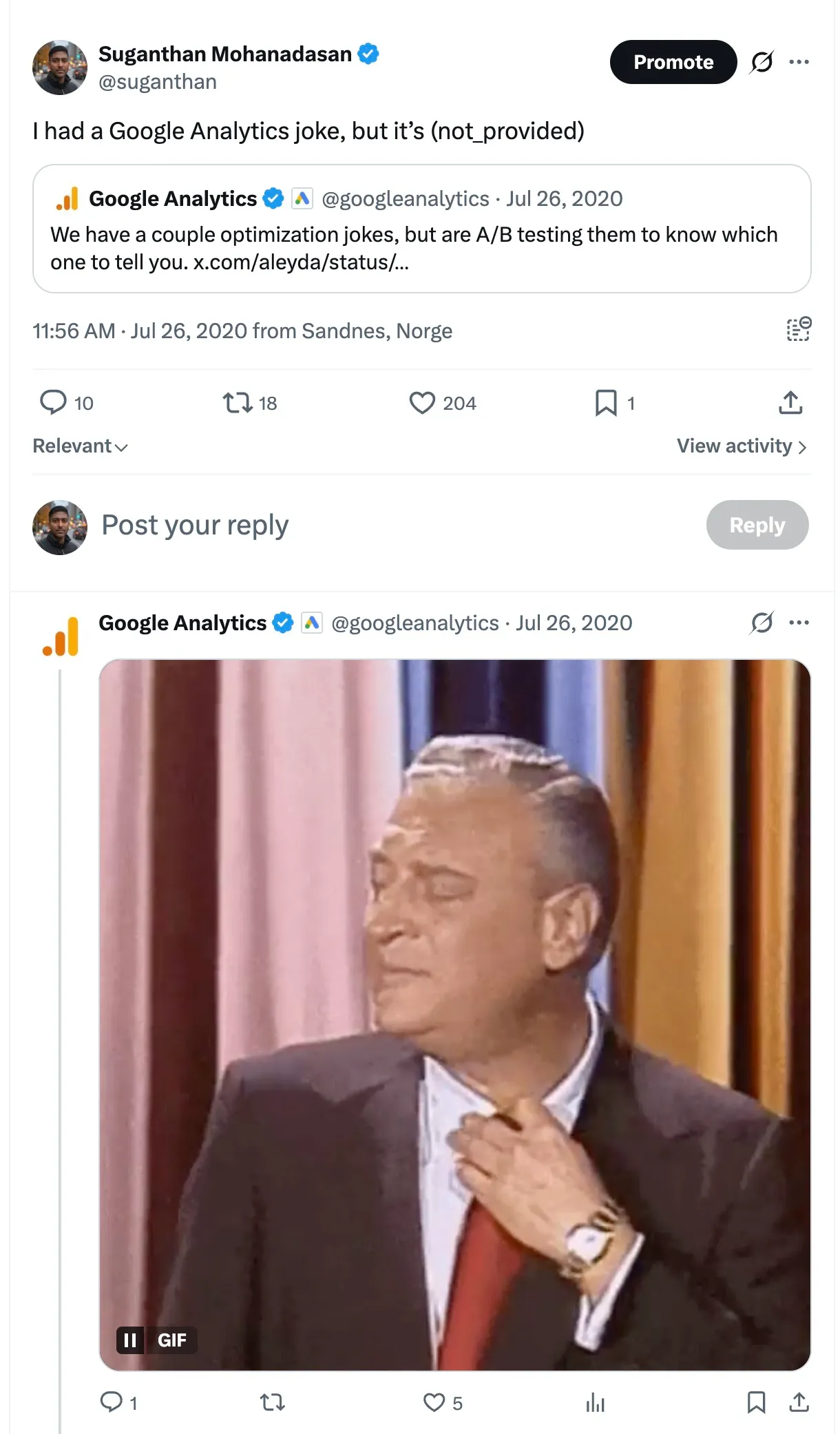
I had this epic moment with Google Analytics twitter team 6 years ago.
GA4 knows which pages convert. Search Console knows which queries drive clicks to those pages. But Google has never connected the two. Not in GA4. Not in Looker Studio. Not anywhere. The native GA4 + Search Console integration is a view-only report you can’t even add conversion metrics to. Google’s own updated guidance from February 2025 essentially says “use Looker Studio.” Which is Google for “we’re not going to fix this.”
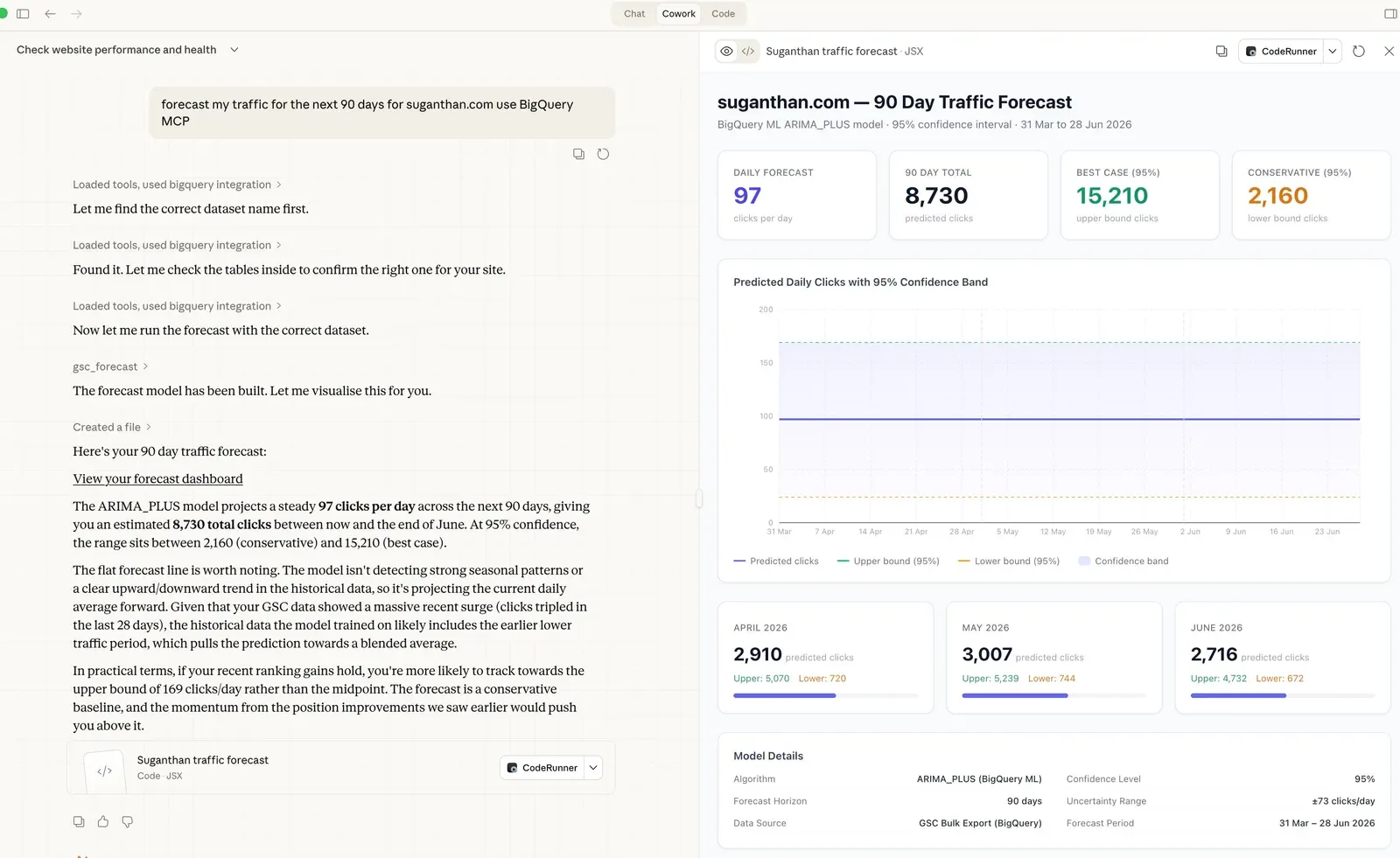
I got tired of the workarounds. So I built 6 tools that join these datasets inside BigQuery and expose them through Claude via the BigQuery MCP server. You ask a question. Claude runs the SQL across both datasets. You get the answer.
No Looker Studio blending. No Supermetrics subscriptions. No 200-line SQL queries you found on Medium.
Everyone is trying to solve the same problem
Before I show you the tools, here’s what I kept seeing in Reddit threads, SEO forums, and agency Slack groups. The same questions, over and over.
“Which keywords actually make me money?” This is the big one. GSC shows clicks. GA4 shows conversions. Nobody can connect the dots without a data warehouse. The existing solutions are Keyword Hero (free tier, then $9 to $149/month, claims a 93% match rate at an 83% certainty threshold using ML guessing) or building your own BigQuery pipeline with window functions. Most people just give up and report on clicks as if clicks pay the bills.
“Why doesn’t my GA4 traffic match Search Console?” This question appears on r/analytics every week. Someone sees 500 clicks in GSC but 340 sessions in GA4 and assumes something is broken. Nothing is broken. Consent mode blocks GA4’s JavaScript on 20 to 40% of visits. Safari strips referrer data. Chrome address bar searches sometimes lose the organic source. GA4 consistently underreports organic traffic by 15 to 30%, and a meaningful chunk of it gets dumped into the “Direct” bucket. As one SEO consultant put it, GA4’s Direct traffic channel is “basically that drawer where you shove batteries, random keys, and takeaway menus.”
“I ranked page 1 but conversions didn’t move.” Without GA4 data alongside GSC data, you can’t diagnose this. The page might rank for the wrong intent. The snippet might be misleading. The content might be great for impressions but terrible for the people who actually click. You need both datasets to separate ranking wins from revenue wins.
“How do I prove SEO ROI to my CFO?” Every SEO pitch includes “if we get you to position 1, traffic will increase.” The CFO doesn’t care about traffic. They care about revenue. Without keyword-level revenue data, every SEO business case is built on vibes. And vibes don’t get budgets approved.
“Is our organic revenue actually branded searches in disguise?” If 80% of your organic conversions come from people searching your company name, your SEO programme isn’t generating new demand. It’s capturing demand that already exists. That’s fine, but it changes everything about where you invest. Without splitting branded from non-branded at the conversion level, you’d never know.
These aren’t edge cases. This is the daily reality for anyone doing SEO with real commercial targets.
What the 6 tools actually do
Each tool runs a specific analysis across both datasets and returns results with Claude’s interpretation. You don’t write SQL. You don’t configure joins. You ask a question in English.
Revenue per keyword
ga4_gsc_query_revenue
The one that makes the whole thing worthwhile. It attributes revenue to individual search queries using proportional click share.
GSC tells you that “best running shoes” sent 40 clicks to /running-shoes/ and “trail running shoes” sent 10 clicks to the same page. That’s an 80/20 split. GA4 tells you /running-shoes/ generated £5,000 in revenue from organic search. The tool attributes £4,000 to “best running shoes” and £1,000 to “trail running shoes.”
Ask Claude: “Which keywords generate the most revenue?”
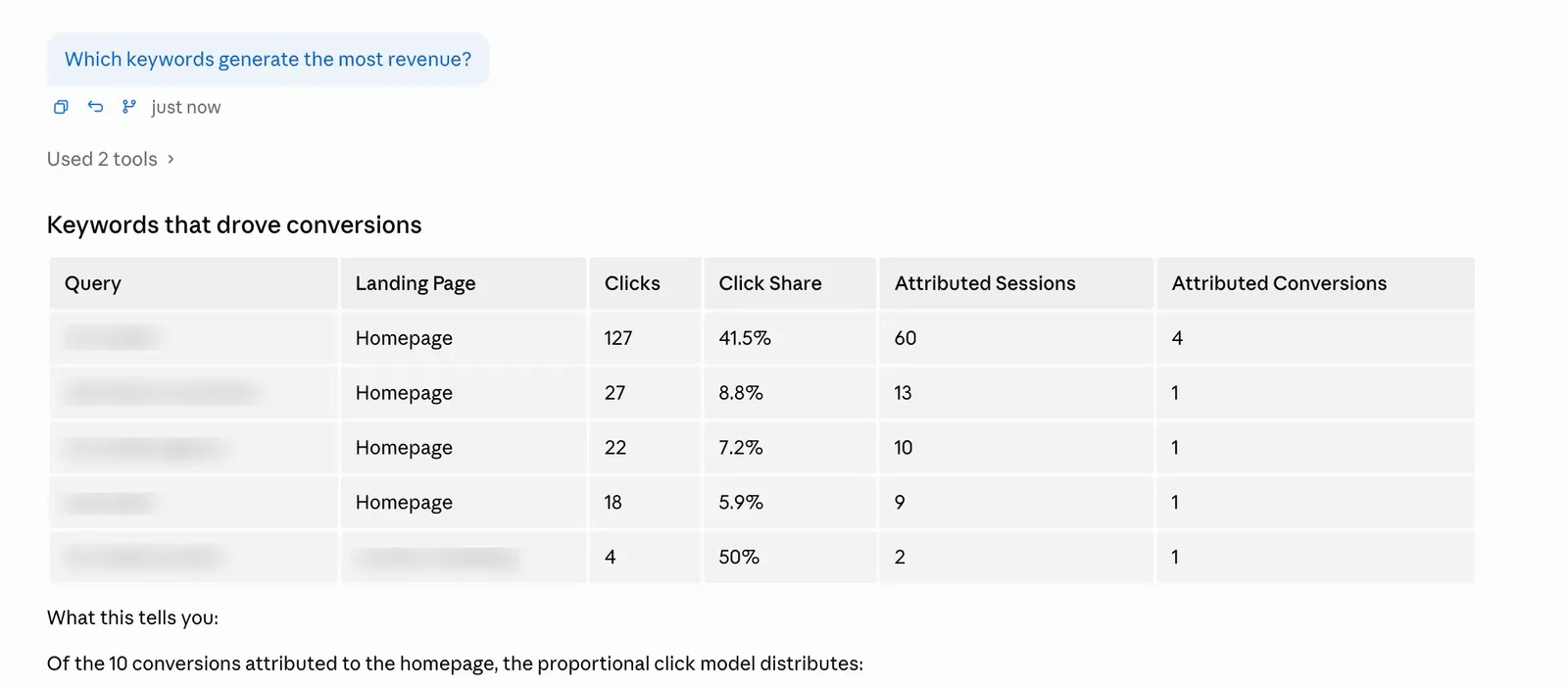
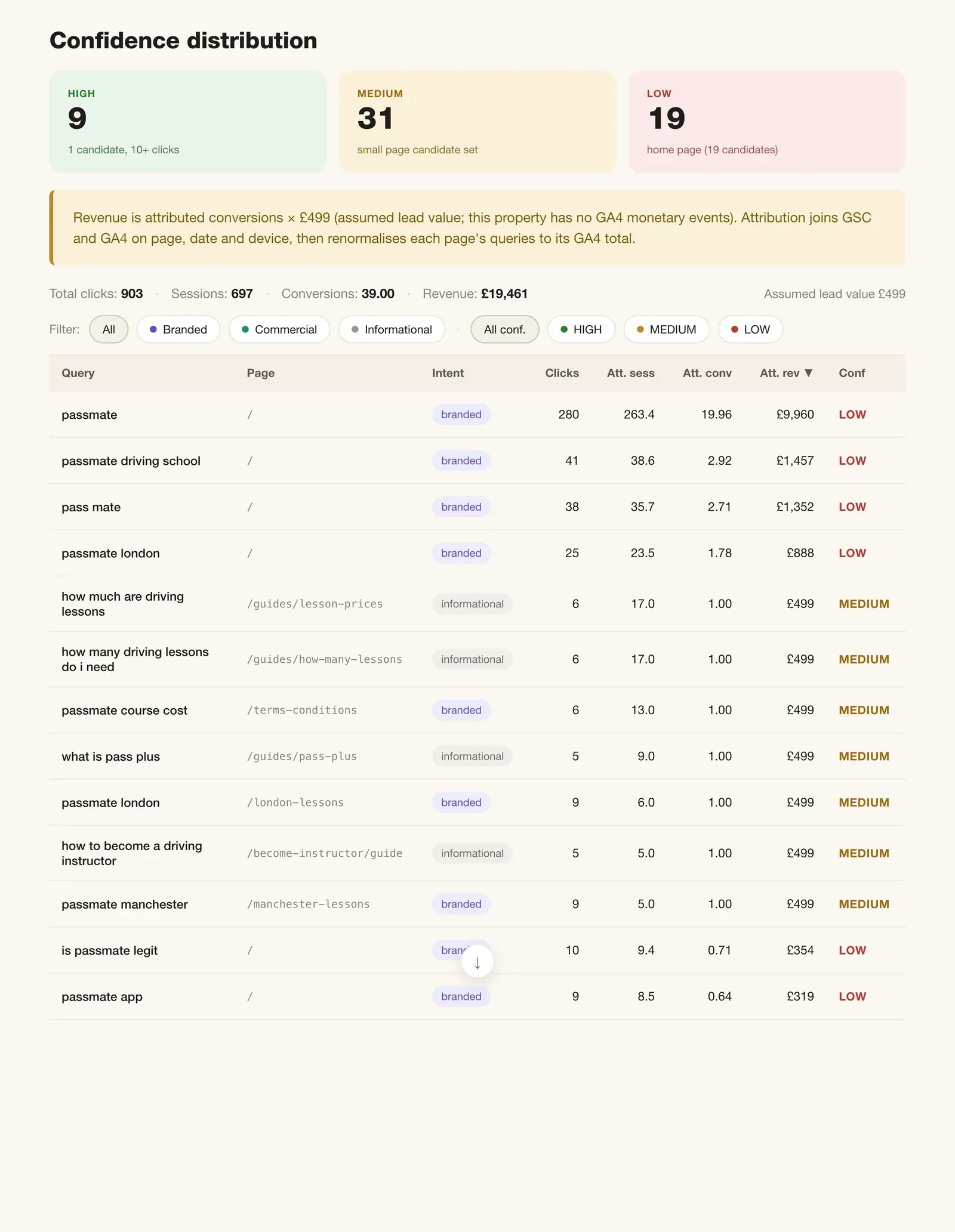
The above example is a lead generation site with no revenue assigned to GA4 conversions, so the revenue column is empty. On an e-commerce site, or anywhere you’ve configured transaction values in GA4, you’ll see the attributed revenue per query.
Here’s a demo of what that looks like.
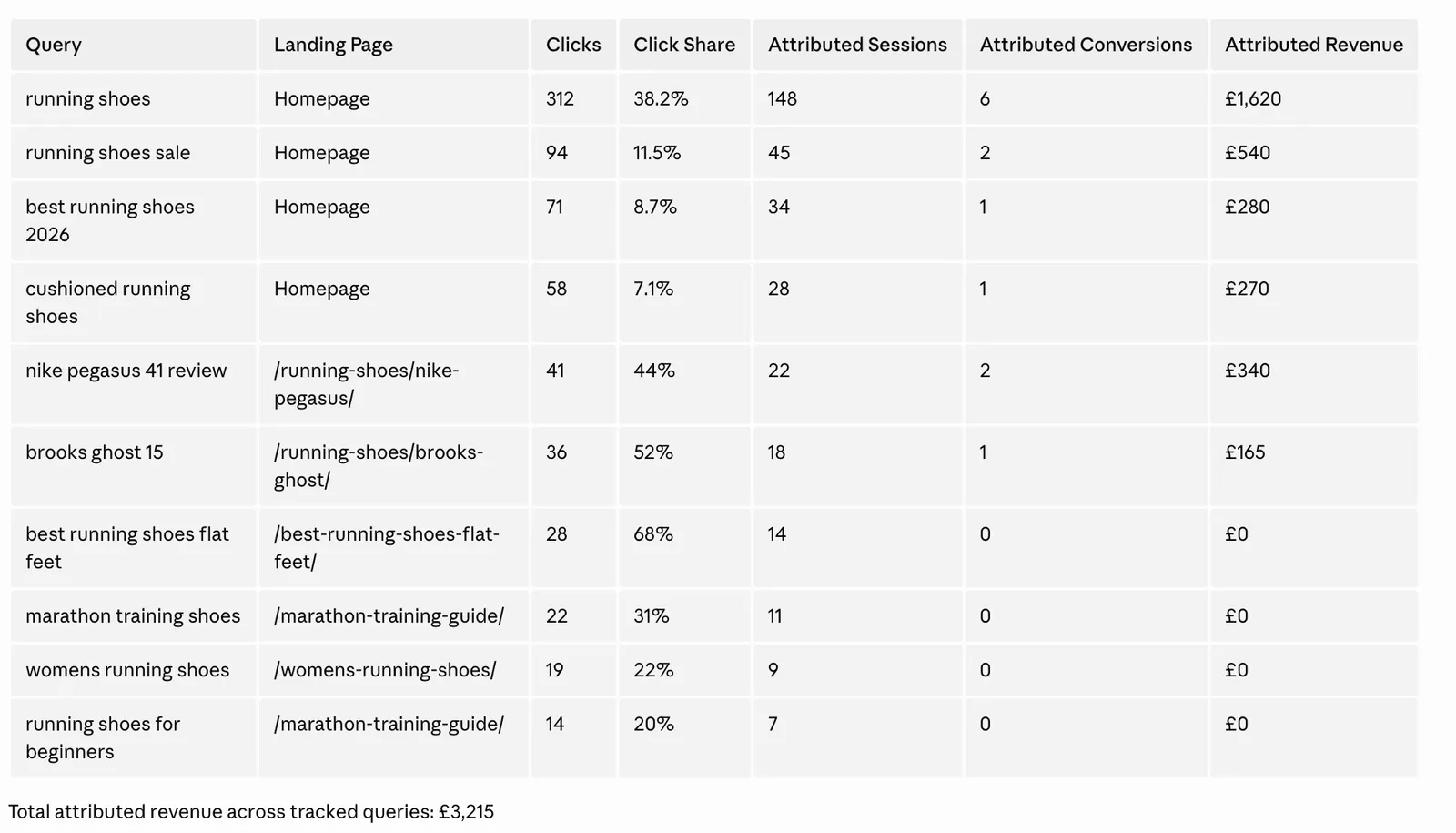
When your Head of Paid asks whether to bid on “running shoes,” you can show them it already generates £1,620/month organically. When your content team asks which topics to prioritise, you point them at the revenue column instead of guessing based on search volume.
The honest limitation. This is proportional attribution, not causal attribution. It assumes every click on a page has equal conversion probability. A branded query click probably converts at 3x the rate of an informational query click. But there’s no way to know that from the available data. Treat the numbers as directional guidance, not accounting figures. GSC also anonymises roughly 46% of queries, so revenue can only be attributed to the visible portion.
Content ROI diagnosis
ga4_gsc_content_roi
This tool classifies every page into 1 of 4 diagnoses based on its search performance combined with conversion data.
Low rank, high conversion. Pages ranking beyond position 20 that convert at 3%+. These are your highest ROI opportunities. Improving rankings on pages that already convert well is the fastest path to more revenue.
High rank, low conversion. Pages in the top 10 that convert below 1%. You’re winning the ranking game but losing the revenue game. The page needs CRO work, not more links.
Engagement problem. Pages where fewer than 40% of sessions are engaged. Something is fundamentally wrong with the content or the user expectation set by the snippet.
Top performer. Pages ranking in the top 5 that convert at 3%+. Leave these alone. Protect them.
Ask Claude: “Which pages have the biggest gap between rankings and conversions?”
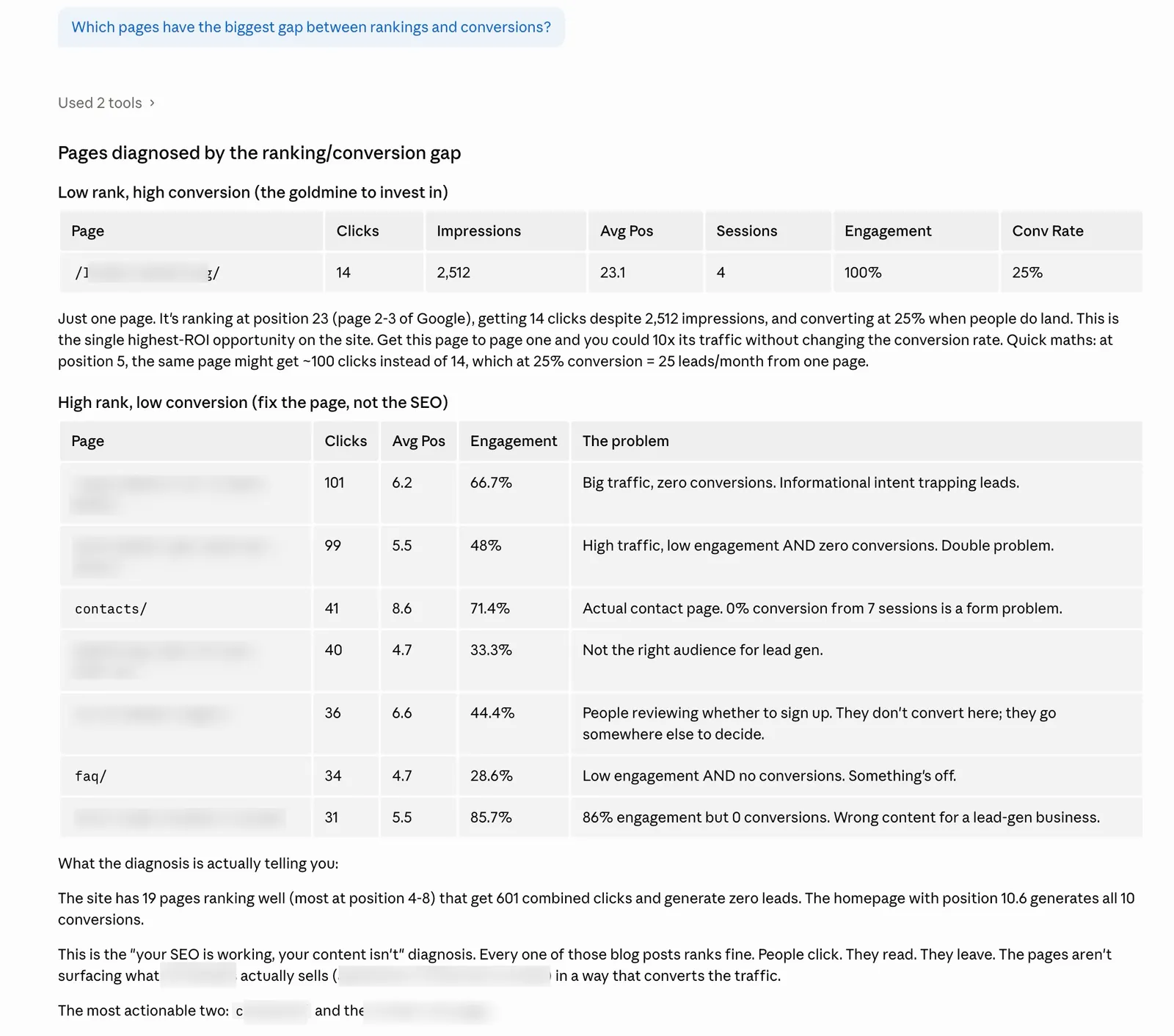
The tool only returns pages with an actionable diagnosis. “Normal” pages are filtered out. You see problems and opportunities, nothing else.
Most SEOs prioritise by traffic volume. This tool prioritises by revenue potential. A page with 200 clicks and a 5% conversion rate is worth more attention than a page with 2,000 clicks and 0.1% conversion rate. Without GA4 data, you’d never know that.
Position value modelling
ga4_gsc_position_value
Every SEO pitch includes some version of “if we get you to position 1, you’ll get X% more clicks.” But what’s that position improvement actually worth in revenue?
This tool buckets all your pages by their average position (1, 2 to 3, 4 to 5, 6 to 10, 11 to 20, 20+) and calculates the conversion rate and revenue per click for each bucket.
Ask Claude: “What is each search position worth on my site?”
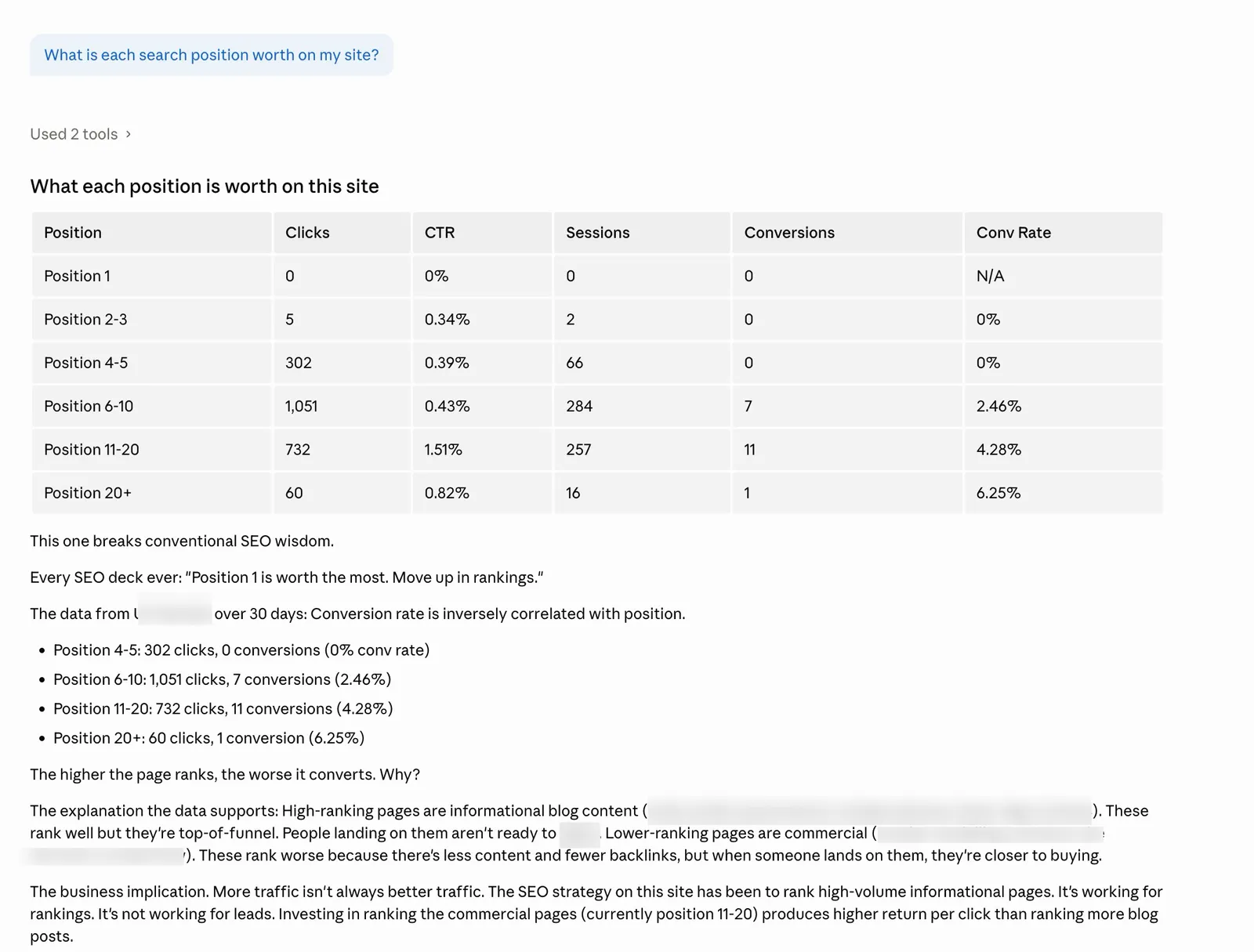
You might find that position 1 pages generate £0.85 per click while position 6 to 10 pages generate £0.12 per click. Or you might find the gap is smaller than expected because your high-converting pages happen to rank lower.
It turns “we need to rank higher” from a vague aspiration into a financial model. If position 2 to 3 generates £0.50/click and you have a page with 1,000 monthly impressions at position 8 (£0.12/click), moving it up has a quantifiable value. This is how you build SEO business cases that finance teams actually approve. The tool defaults to 90 days of data for statistical significance.
Snippet mismatch detection
ga4_gsc_snippet_mismatch
High CTR with low engagement means your snippet is promising something the page doesn’t deliver. Low CTR with high engagement means your snippet is underselling a page that users actually love once they get there.
Misleading snippet. CTR above 8% but engagement rate below 40%. People click because the snippet looks compelling, then bounce because the content doesn’t match. Fix the page content or rewrite the meta description to set accurate expectations.
Underselling snippet. CTR below 3% but engagement rate above 70%. The page is great. People who land on it stay and engage. But the snippet isn’t convincing enough to get the click. Rewrite the title tag and meta description.
Ask Claude: “Which pages have a mismatch between their search snippet and actual content quality?”
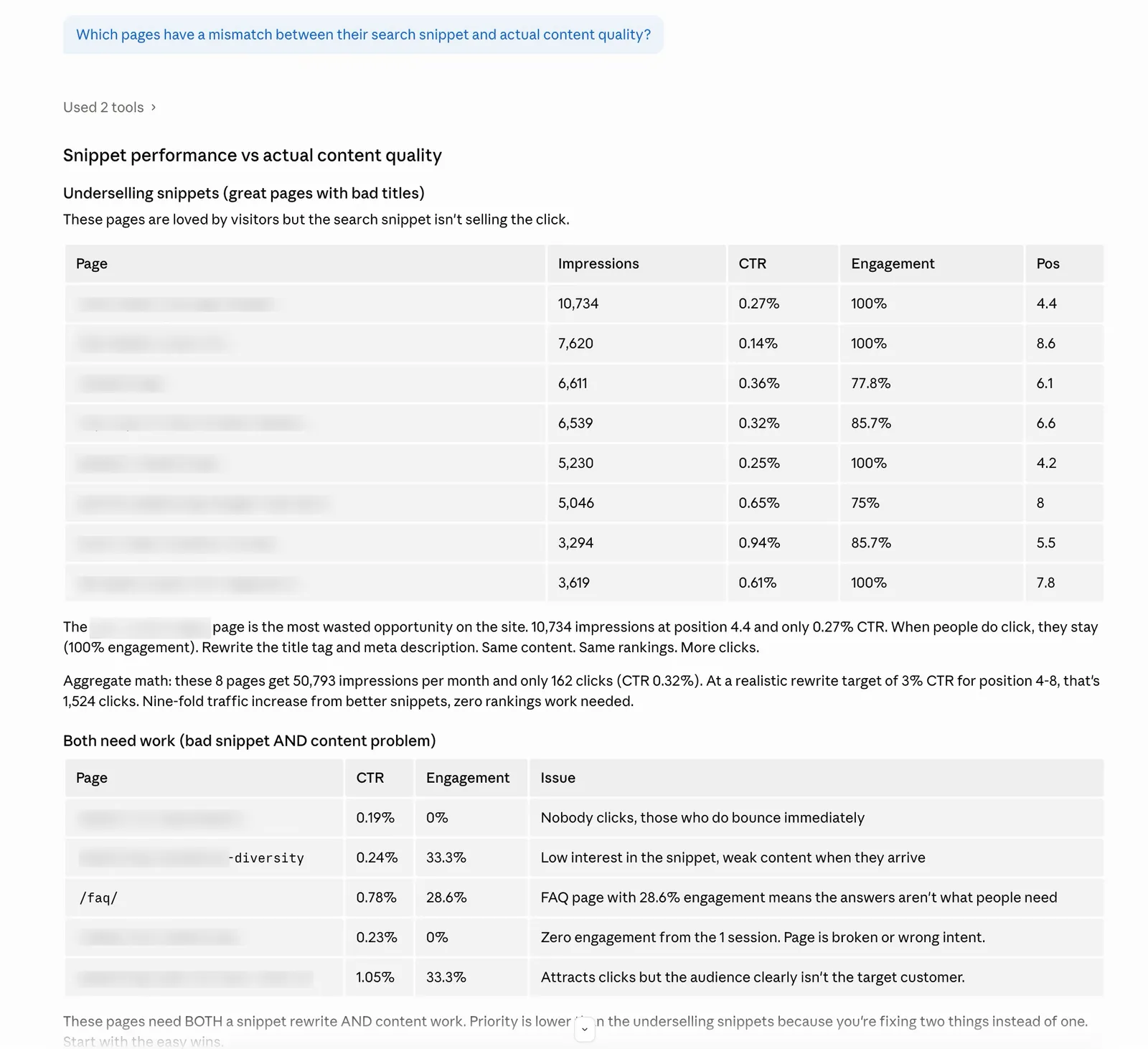
Only mismatched pages are returned. Sorted by impressions so you fix the highest-impact problems first. Every other CTR optimisation tool just tells you “this page has low CTR.” This tool tells you why and what to do about it. An underselling snippet on a high-converting page is leaving money on the table. A misleading snippet is actively burning your brand with Google’s user satisfaction signals.
Branded vs non-branded performance
ga4_gsc_branded_performance
You provide your brand terms (comma-separated) and the tool splits all GSC data into branded and non-branded traffic, then joins each segment with GA4 engagement and conversion data.
Ask Claude: “Compare branded vs non-branded performance for ‘snippetdigital, snippet digital’”
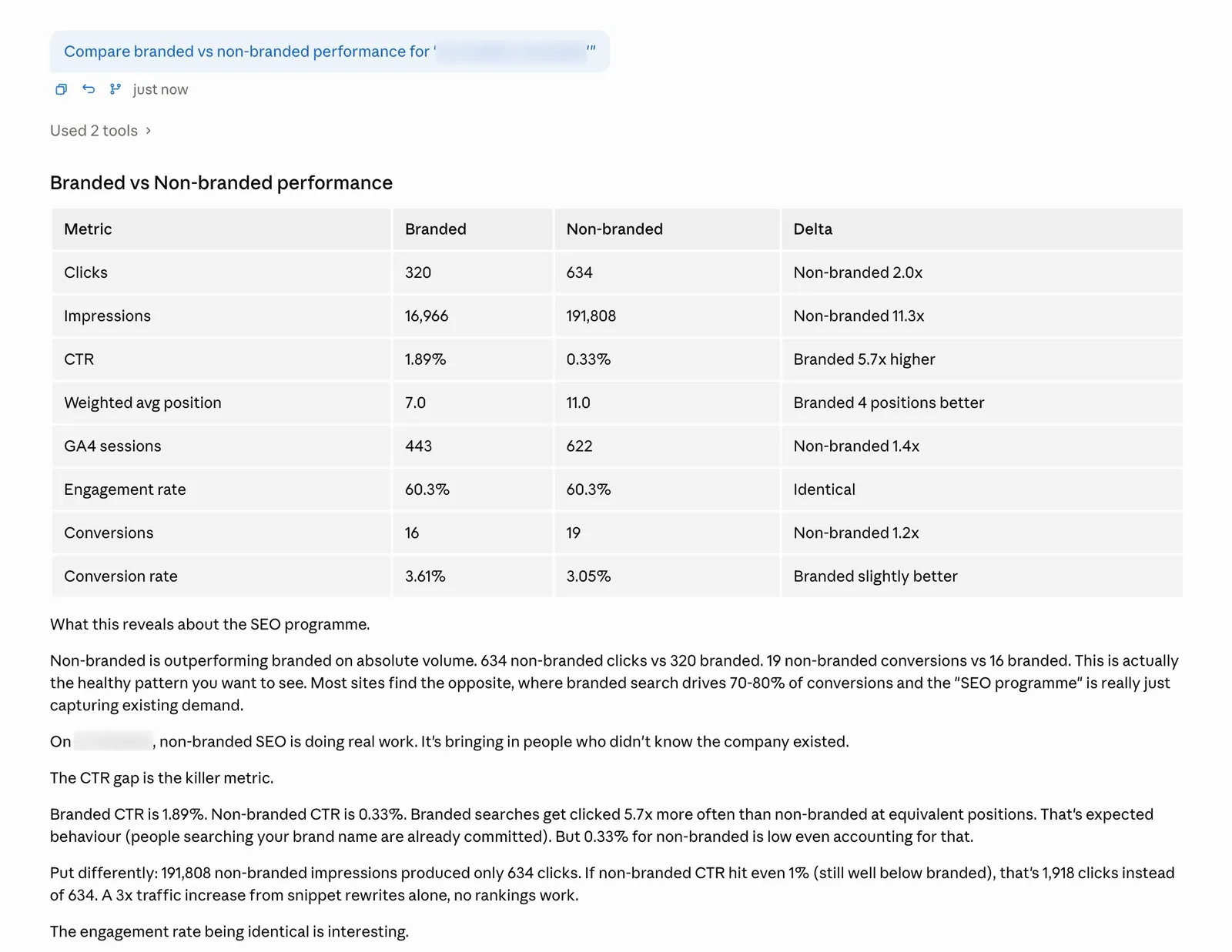
You’ll see how many clicks, impressions, sessions, conversions, and revenue come from each segment. Plus engagement rate and conversion rate percentages.
If 80% of your organic conversions come from branded queries, your SEO isn’t driving new business. It’s capturing existing demand. That’s a fundamentally different conversation with your CMO. For agencies, this is how you justify the retainer. Show the client their branded vs non-branded conversion gap and the strategy writes itself.
Page-level performance
ga4_gsc_page_performance
The base layer that the other 5 tools build on. It joins GSC search metrics (clicks, impressions, CTR, average position) with GA4 engagement metrics (sessions, users, engagement rate, conversions, revenue) per landing page.
Ask Claude: “Show me page performance combining search and analytics data”
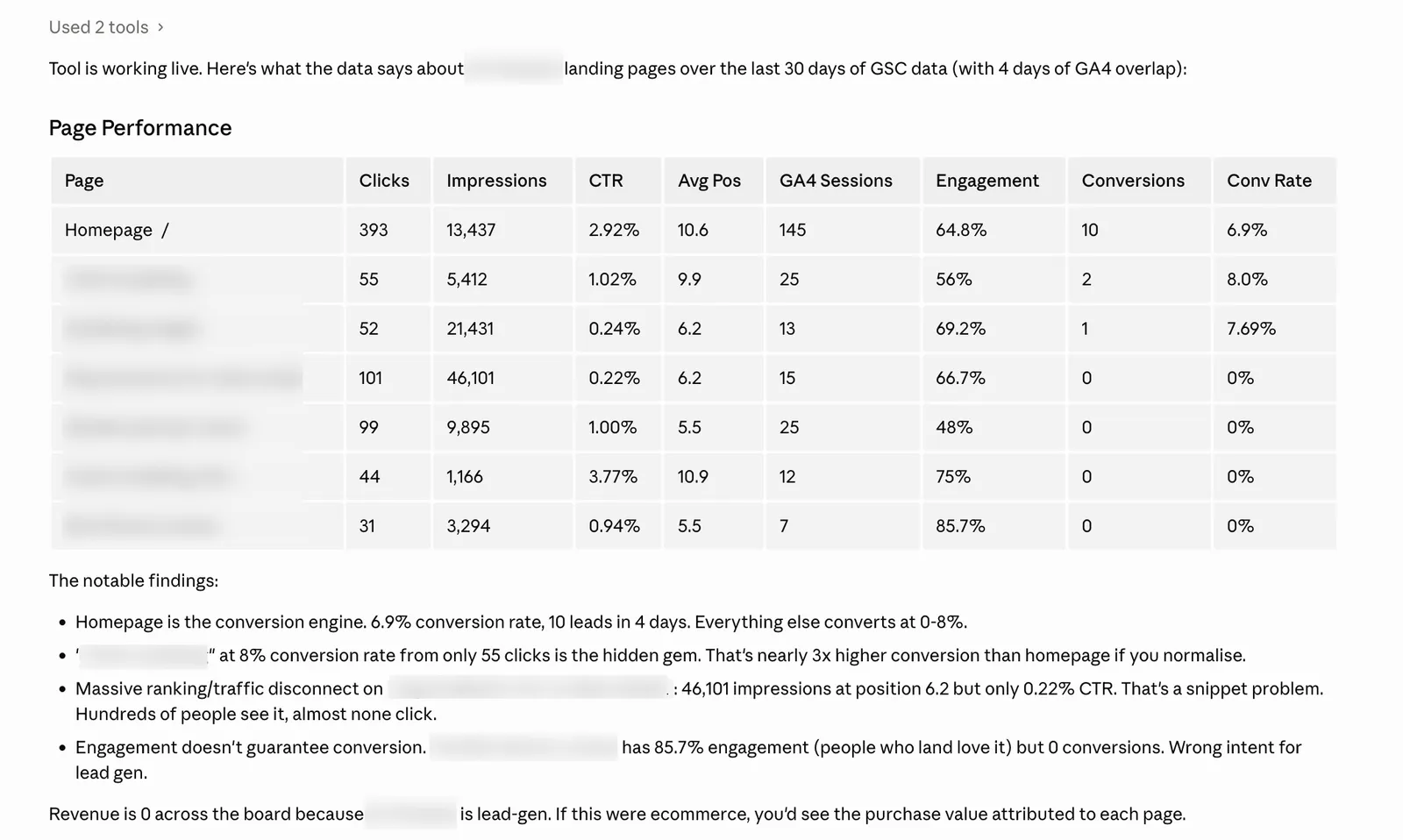
Every row gives you the full picture for a single page. Search visibility on the left, user behaviour on the right. Sorted by clicks so your most important pages are at the top.
This is the report that should exist natively in Google’s tools but doesn’t. GA4’s landing page report doesn’t show search positions. GSC’s pages report doesn’t show conversions. This tool shows both.
An improved version of revenue attribution (new)
The ga4_gsc_query_revenue tool above uses proportional click share. It is the simplest version of the methodology and it works well enough for most reporting. But proportional click share has 3 honest weaknesses, and after I shipped the tool I built a free open source skill that fixes all 3.
The 3 weaknesses of proportional click share:
- It joins on landing page only. The same landing page on mobile gets different queries than desktop. UK queries don’t drive US sessions. A click on Tuesday cannot have caused a conversion on Friday. The tool ignores all of this.
- It treats every click as equally likely to convert. A branded query click probably converts at 3 times the rate of an informational query click. The tool weights them the same.
- No confidence per row. Every attributed number looks equally trustworthy in the output. They aren’t. The home page with 19 candidate queries has fuzzier attribution than a long-tail page with 1 dominant query, but the table doesn’t tell you that.
The skill fixes all 3:
- It narrows the candidate set by 3 signals. Same landing page, same date, same device. Every GA4 session only matches GSC queries that line up on all 3 dimensions before any revenue gets distributed.
- It applies intent weighting. Branded 3.0x, transactional 2.0x, commercial 1.5x, navigational 1.0x, informational 0.5x. After weighting, the skill renormalises within each landing page so the total attributed revenue still equals the page’s actual GA4 revenue. The weighting redistributes credit. It does not invent revenue.
- It scores confidence per row. Each attributed keyword comes back with HIGH, MEDIUM, or LOW confidence based on how many candidate queries were competing for the page and how many clicks it had. Sort by confidence. Trust the HIGH rows. Discount the LOW rows.
When to use which:
| Situation | Use ga4_gsc_query_revenue | Use the multi-signal skill |
|---|---|---|
| Quick answer in 30 seconds | ✅ | |
| Reporting headline numbers to a client | ✅ | |
| You want to know which numbers to trust | ✅ | |
| Your branded queries are mostly on the home page (high competition) | ✅ | |
| You need to defend the methodology to a CFO | ✅ | |
| You want to tune the intent multipliers to your data | ✅ |
Both run on the same BigQuery pipeline. You can use the prebuilt tool for fast checks and the skill for deeper analysis.
The full guide on the methodology, install instructions, the 323-line SQL, and tuning examples for different brand types is in the dedicated post: How to Unlock “Not Provided” Keywords in Google Analytics.
How the data join works, and where it breaks
I’d rather you know what doesn’t work than discover it yourself.
GSC and GA4 don’t share a single identifier. GSC tracks queries and URLs. GA4 tracks sessions, events, and page locations. They use different counting methods, different time zones, and different definitions of what constitutes a “visit.”
The tools handle this by normalising URLs (stripping query parameters, fragments, lowercasing) and joining on landing page. For keyword-level attribution, they calculate each query’s share of clicks to a page and distribute that page’s GA4 metrics proportionally. This is the same methodology used by other popular tools and services, just automated so you don’t need to write SQL.
The join rate won’t be 100%. Consent mode means GA4 misses sessions that GSC counted as clicks. Bot filtering means GSC counts clicks that GA4 doesn’t see as sessions. Some pages will appear in one dataset but not the other.
Revenue attribution is directional, not precise. The proportional click share model is a proxy. The best available proxy, but still a proxy. Don’t use these numbers for financial reporting. Use them for prioritisation.
GSC anonymises roughly 46% of queries. Revenue attribution only works on the visible portion. Pages heavily reliant on long-tail queries will have understated keyword-level revenue.
GA4 and GSC data can diverge significantly. Don’t be alarmed if GSC shows 500 clicks and GA4 shows 340 sessions for the same page. Consent mode, timezone differences (GSC uses Pacific Time, GA4 uses your configured timezone), redirect chains, and JavaScript rendering issues all contribute.
Setup
You need 3 things in place before the GA4 tools will work. A Google Cloud project with BigQuery enabled, the GSC bulk export already flowing into BigQuery, and the GA4 export added alongside it. If you already have the BigQuery MCP server running with your GSC data, skip straight to Step 3.
Step 1. Set up the BigQuery MCP server with GSC data
If you haven’t done this yet, follow the full BigQuery MCP server setup guide first. That guide walks you through everything from scratch.
- Creating a Google Cloud project (free tier is enough)
- Enabling the BigQuery API
- Creating a service account and downloading the JSON key file
- Enabling GSC bulk data export (Search Console > Settings > Bulk Data Export)
- Installing the MCP server and connecting it to Claude
The GSC bulk export needs to be running before you add GA4. It takes about 48 hours for the first batch of GSC data to appear in BigQuery after you enable it.
Once you can ask Claude “Show me my quick win keywords” and get results from your GSC data, come back here for Step 2.
Step 2. Enable GA4 BigQuery export
Open Google Analytics. Select your GA4 property, then navigate to Admin (gear icon, bottom left).
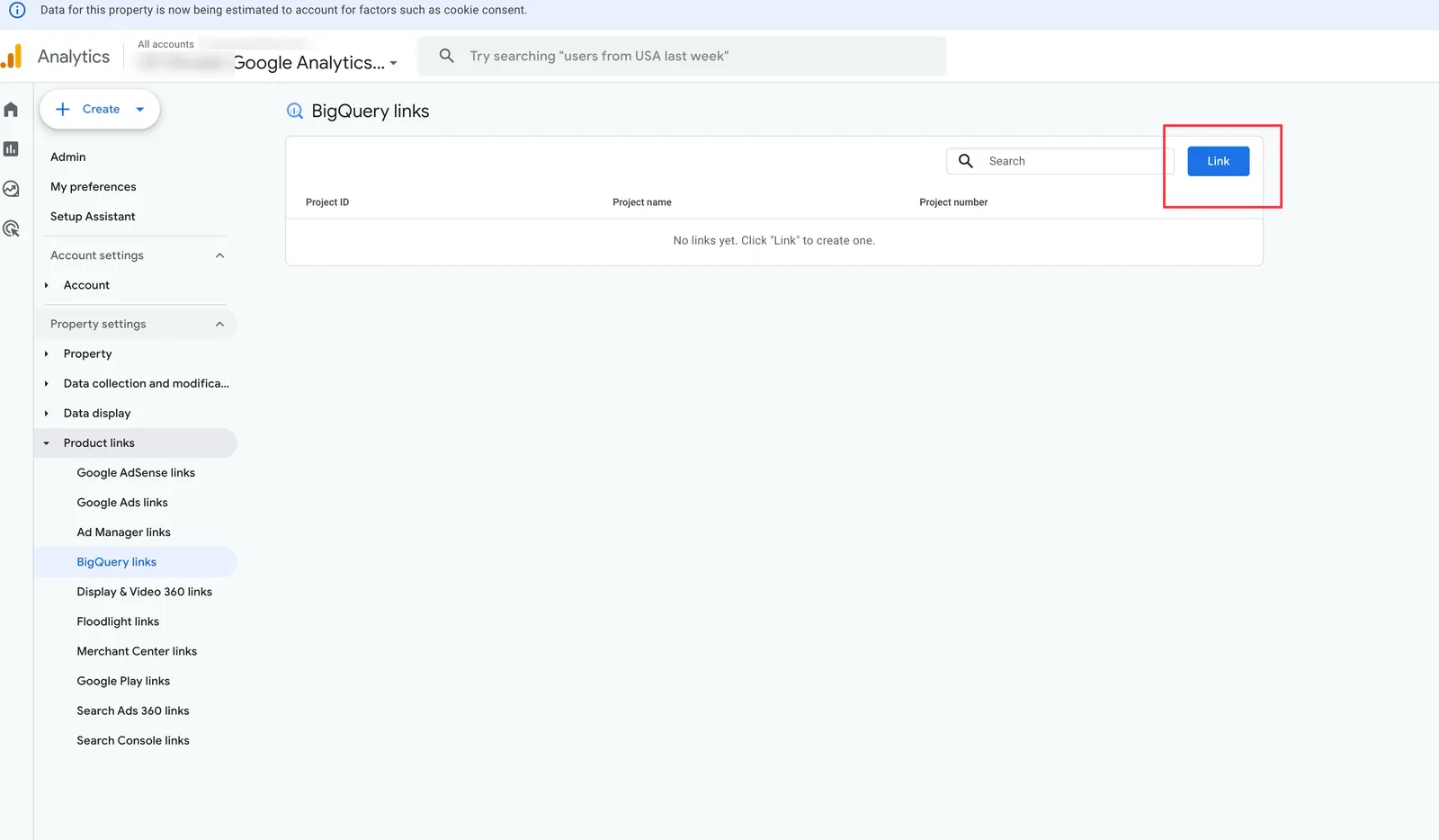
Scroll down to Product Links and click BigQuery Links.
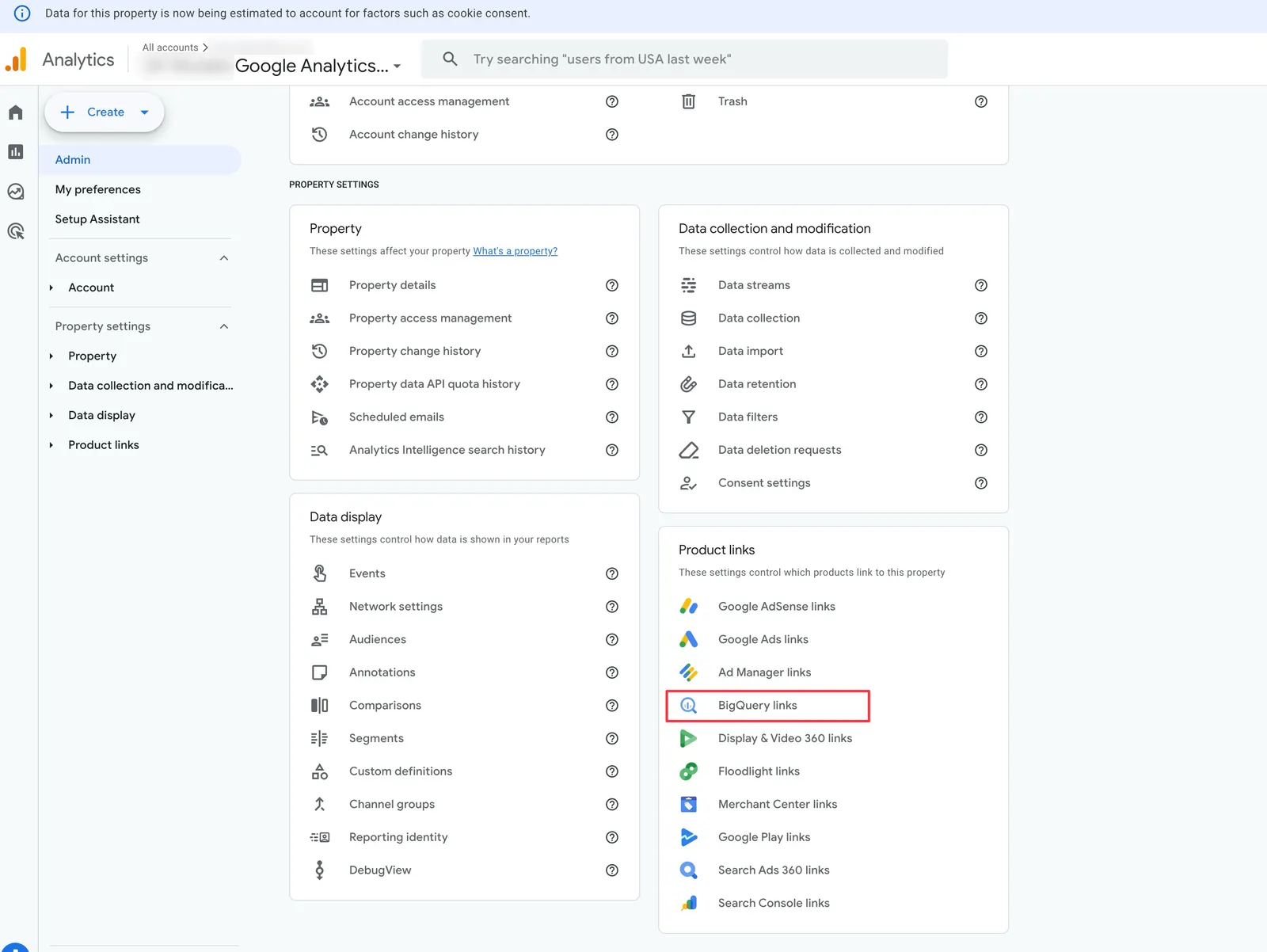
Click the Link button in the top right. You’ll see a setup wizard.
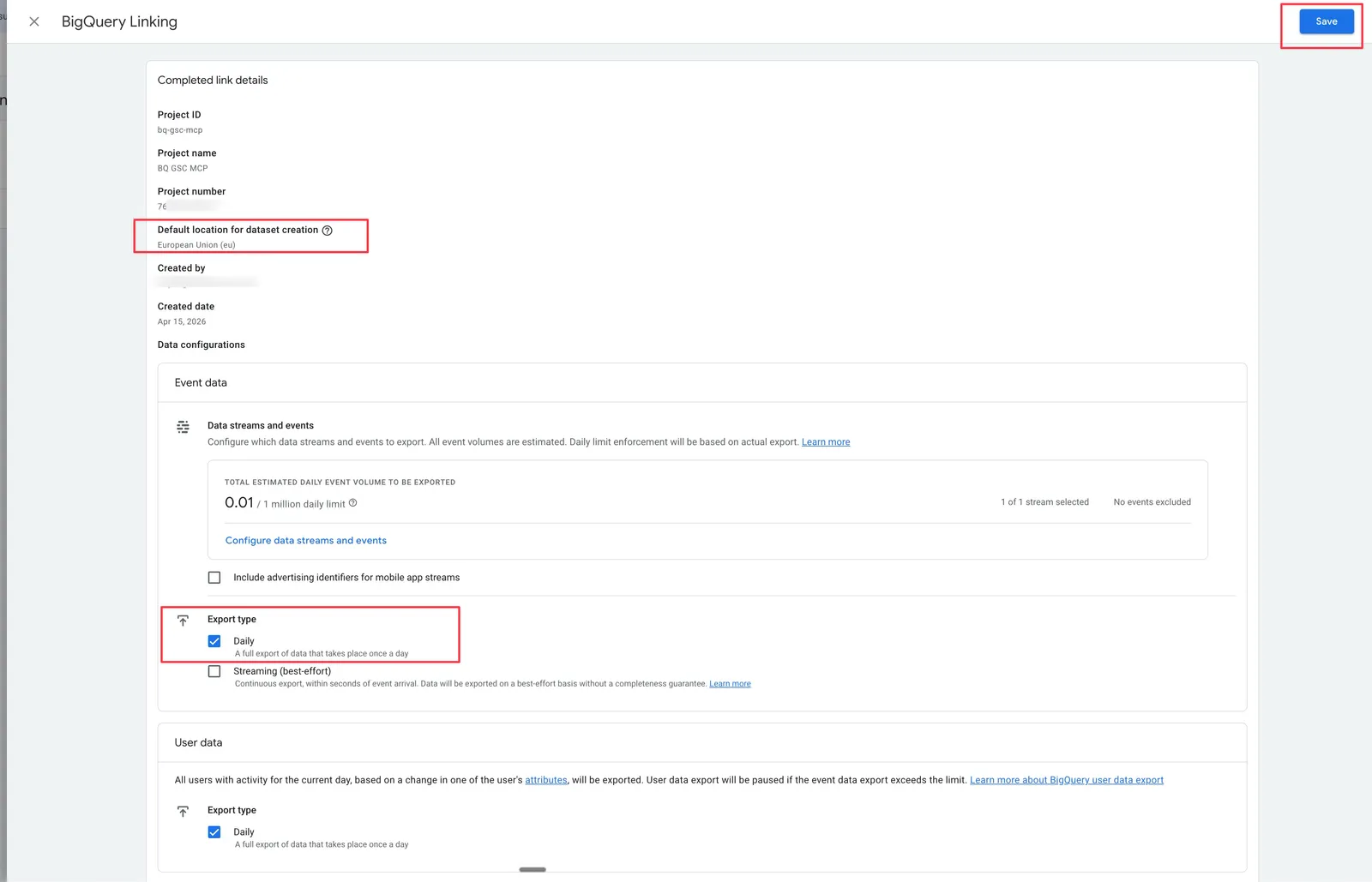
Choose BigQuery project. Select the same Google Cloud project you used for your GSC export. This is important. Both datasets need to live in the same project, or you’ll need to set up cross-project permissions on your service account later.
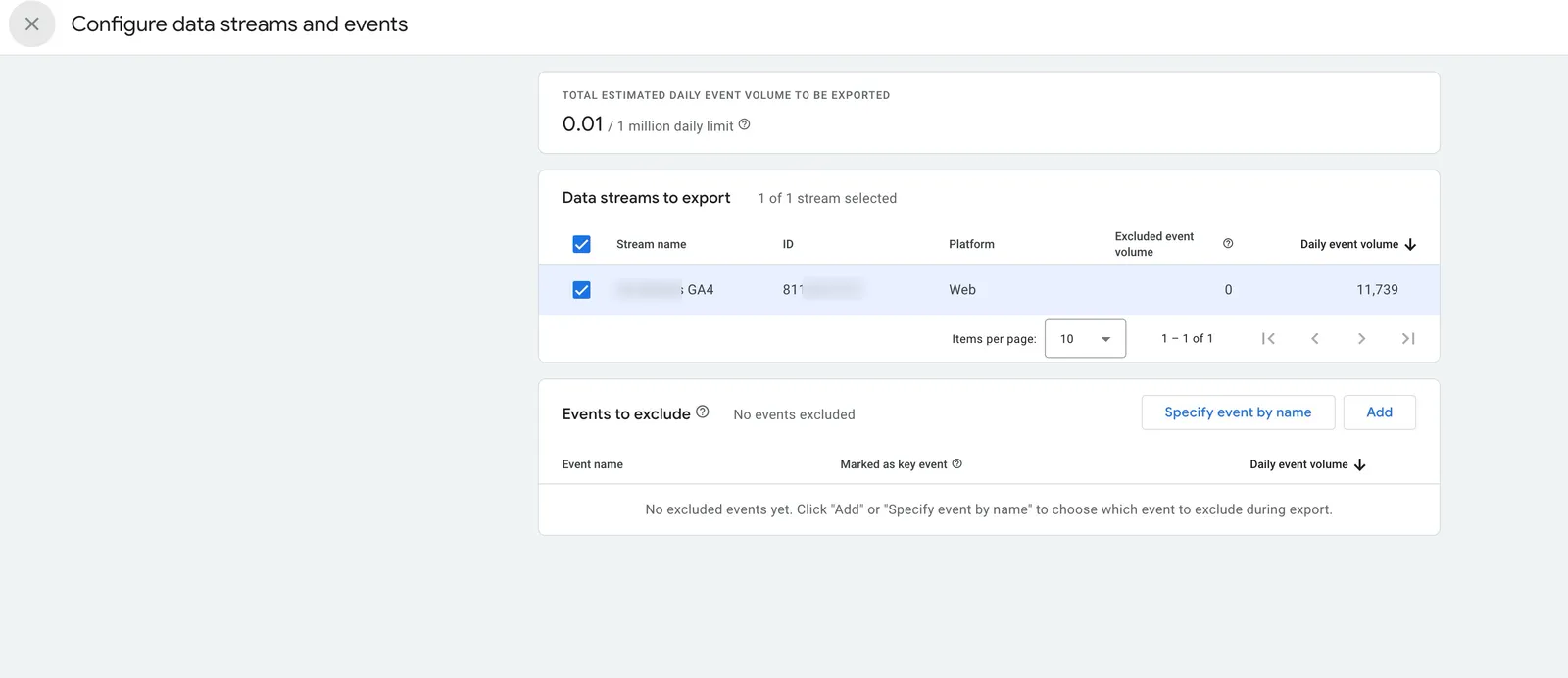
Configure data streams. Select your web data stream (there’s usually only 1).
Choose export type. Pick Daily (free) or Streaming ($1 to $5/month for most sites). Daily is fine for SEO analysis. You’re looking at trends and attribution over 28 to 90 day windows, not real-time dashboards. You can always upgrade to streaming later.
Select events. Check Include all events. You want conversion and engagement data for the revenue attribution tools.
Click Submit.
GA4 will create a new dataset in your BigQuery project named analytics_XXXXXXXXX. The numbers match your GA4 property ID. You can find your property ID in GA4 under Admin > Property Settings.
The first export takes 24 to 48 hours to appear. Don’t panic if BigQuery shows an empty dataset immediately after linking. Once data starts flowing, you’ll see tables named events_YYYYMMDD (one per day for daily export) or events_intraday_YYYYMMDD (if you chose streaming).
Step 3. Find your GA4 dataset name
Open the BigQuery console. In the left sidebar under your project, you should now see 2 datasets.
- Your GSC dataset (usually called
searchconsole) - Your GA4 dataset (named
analytics_XXXXXXXXX)
Click on the GA4 dataset. The name you see is what you need for the next step. It will look something like analytics_348712456.
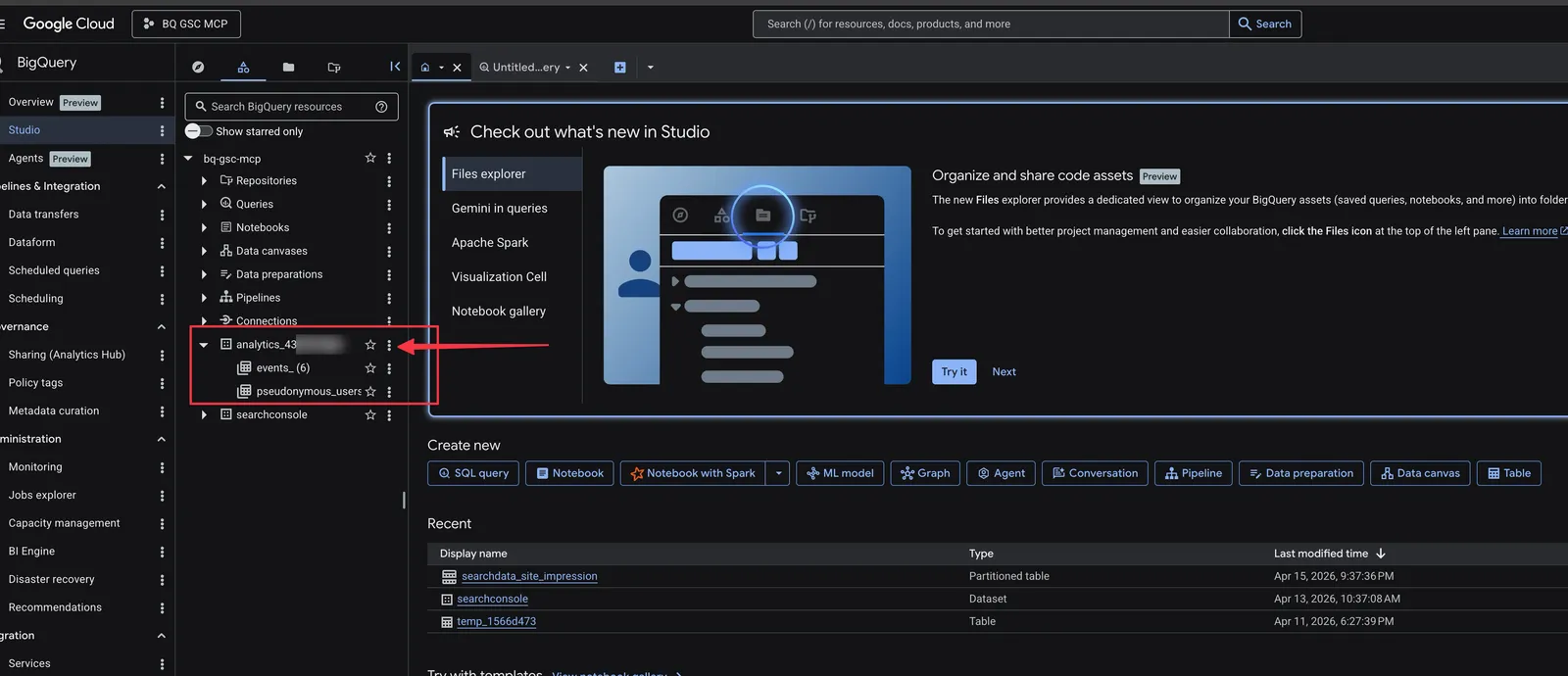
Note: If you only see the GSC dataset and not the GA4 one, either the export hasn’t finished its first run yet (wait 48 hours) or you linked GA4 to a different Google Cloud project.
Step 4. Add the GA4 dataset to your MCP config
Open your MCP server configuration and add the BIGQUERY_GA4_DATASET variable. This tells the server where to find your GA4 data.
Claude Desktop (edit ~/Library/Application Support/Claude/claude_desktop_config.json):
{
  "mcpServers": {
    "bigquery": {
      "command": "node",
      "args": ["/path/to/Suganthans-BigQuery-MCP-Server/dist/index.js"],
      "env": {
        "BIGQUERY_PROJECT_ID": "your-project-id",
        "BIGQUERY_KEY_FILE": "/path/to/service-account-key.json",
        "BIGQUERY_DEFAULT_DATASET": "searchconsole",
        "BIGQUERY_LOCATION": "US",
        "BIGQUERY_GA4_DATASET": "analytics_348712456"
      }
    }
  }
}
Claude Code (edit ~/.claude/settings.json):
{
  "mcpServers": {
    "bigquery": {
      "command": "node",
      "args": ["/path/to/Suganthans-BigQuery-MCP-Server/dist/index.js"],
      "env": {
        "BIGQUERY_PROJECT_ID": "your-project-id",
        "BIGQUERY_KEY_FILE": "/path/to/service-account-key.json",
        "BIGQUERY_DEFAULT_DATASET": "searchconsole",
        "BIGQUERY_LOCATION": "US",
        "BIGQUERY_GA4_DATASET": "analytics_348712456"
      }
    }
  }
}
Replace analytics_348712456 with the dataset name you found in Step 3. The other environment variables should already be filled in from your existing BigQuery MCP server setup.
Save the file.
Restart Claude Desktop (or restart the Claude Code terminal session).
The 6 GA4 tools will appear automatically alongside the existing 26 GSC tools.
No code changes needed.
Step 5. Grant BigQuery access to the GA4 dataset
Your service account already has access to the GSC dataset, but it might not have access to the GA4 dataset. If you get permission errors when running the GA4 tools, this is why.
Go to the BigQuery console. Click on your GA4 dataset (analytics_XXXXXXXXX). Click Sharing then Permissions. Click Add Principal.
Enter your service account email (it looks like your-name@your-project.iam.gserviceaccount.com). You can find this in your service account JSON key file under the client_email field. (You saved this during the BigQuery setup in the first part)
Assign the BigQuery Data Viewer role. Click Save.
If you set up your service account with project-level permissions (as recommended in the BigQuery MCP server guide), it already has access to all datasets in the project and you can skip this step.
Step 6. Test the connection
Ask Claude: “List the tables in my GA4 dataset”
You should see a list of events_YYYYMMDD tables, one for each day since you enabled the export. If you see tables, the connection is working.
Now test the actual GA4 + GSC join: “Show me page performance combining search and analytics data for the last 7 days”
If that returns a table with both GSC metrics (clicks, impressions, CTR, position) and GA4 metrics (sessions, engagement rate, conversions) side by side, you’re done. All 6 tools will work.
Common issues:
- “Dataset not found” error. Double check the dataset name in your config matches exactly what you see in BigQuery. It’s case-sensitive.
- “Access denied” error. Your service account needs BigQuery Data Viewer on the GA4 dataset. See Step 5.
- GA4 metrics are all zeros. The export might not have run yet. Wait 48 hours after enabling the link in Step 2.
- Results show GSC data but no GA4 data. The URL formats might not be matching. Check that your GA4 property is tracking the same domain as your GSC property.
All 6 tools at a glance
| Tool | What it answers | Default period |
|---|---|---|
ga4_gsc_query_revenue | How much revenue does each keyword generate? | 28 days |
ga4_gsc_content_roi | Which pages have the biggest ranking vs conversion gap? | 28 days |
ga4_gsc_position_value | What is each search position worth in revenue? | 90 days |
ga4_gsc_snippet_mismatch | Which snippets are misleading or underselling? | 28 days |
ga4_gsc_branded_performance | How does branded vs non-branded traffic convert? | 28 days |
ga4_gsc_page_performance | Full page-level search + analytics metrics | 28 days |
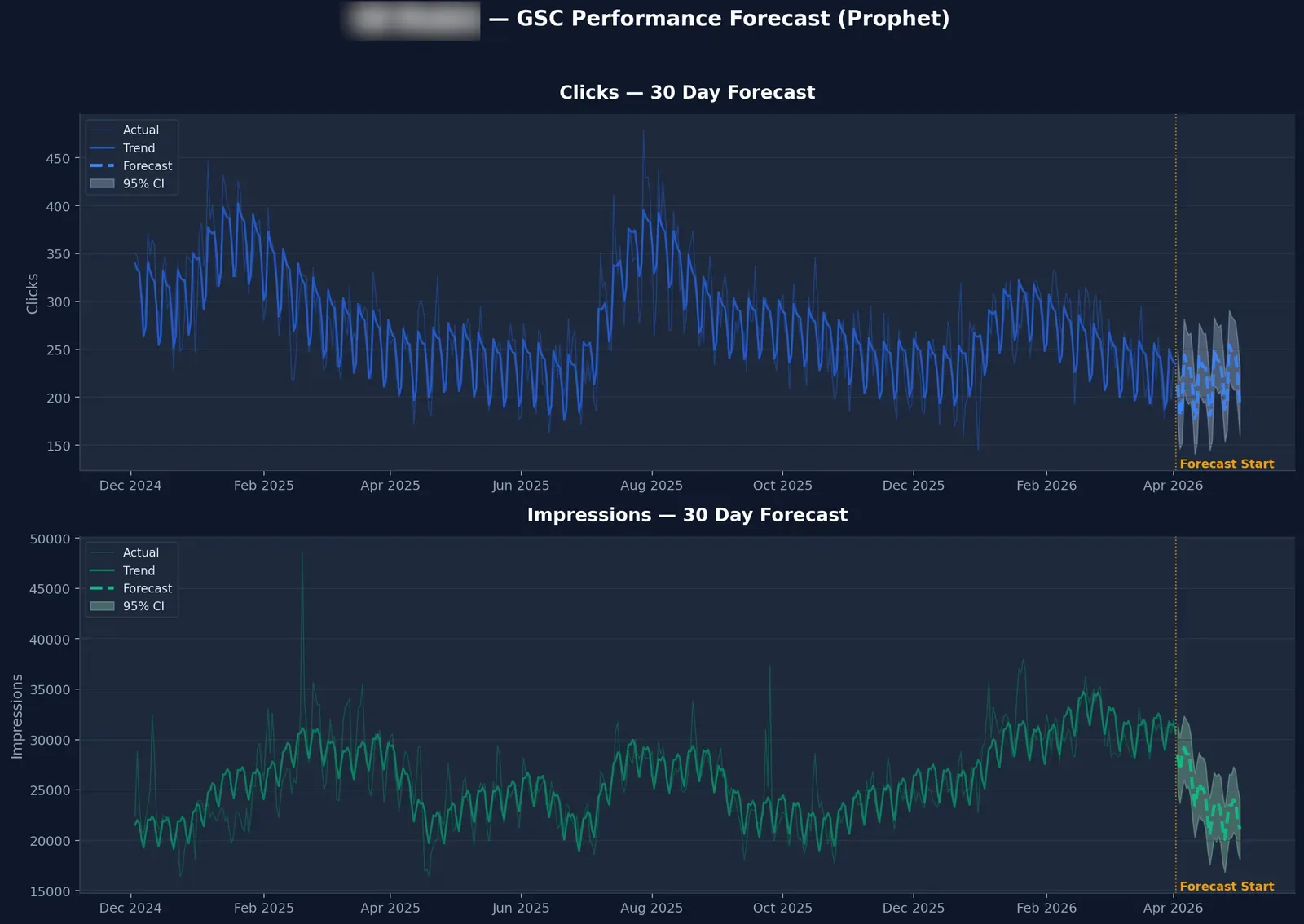
These bring the BigQuery MCP server to 32 tools total. The other 26 cover GSC-only analysis including ML forecasting, anomaly detection, anonymous query analysis, and more. Full list here.
Changelog
May 2026 Added a new section on the multi-signal attribution skill as an improved version of ga4_gsc_query_revenue. The skill is a free open source upgrade that adds 3-signal narrowing, intent weighting, and confidence scoring per row. Full guide and SQL in the companion post on “(not provided)” keywords.
Initial release (April 2026) 6 GA4 + GSC tools for the BigQuery MCP server: ga4_gsc_query_revenue, ga4_gsc_content_roi, ga4_gsc_position_value, ga4_gsc_snippet_mismatch, ga4_gsc_branded_performance, and ga4_gsc_page_performance. Bringing the BigQuery MCP server to 32 tools total.
The source code
Everything is open source under Apache 2.0.
GitHub: Suganthan’s BigQuery MCP Server
If you build something interesting with these tools, let me know. I’m particularly curious whether the revenue attribution model holds up across different site types. Ecommerce with explicit transaction values is the easy case. Lead gen where “conversion” means a form fill and the revenue is estimated is harder. Affiliate sites where the money happens off-site entirely might be the most interesting test.